

A baby monitor can give an older grandparent or relative a way to hear or see a child in another room without remaining beside the crib. The most useful setup combines dependable transmission, controls that are easy to understand, and enough range to cover your home. These options range from simple audio monitoring to video systems with multiple rooms, remote access, and automatic night viewing.
A Quick View Of The Lineup

VTech VM320 2.4-Inch Video Baby Monitor with Night Vision
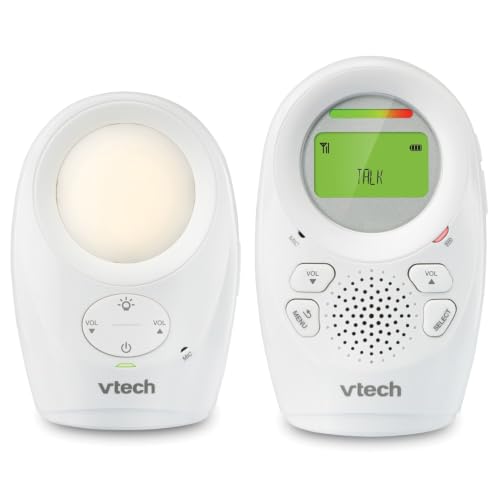
VTech DM1211 Audio Baby Monitor with Talk-Back

Babysense V43 Add-On Camera with Pan, Tilt and Night Light

ieGeek 5-Inch No-WiFi Baby Monitor

GoodBaby 5-Inch No-WiFi Monitor

GoodBaby No-WiFi Video Baby Monitor
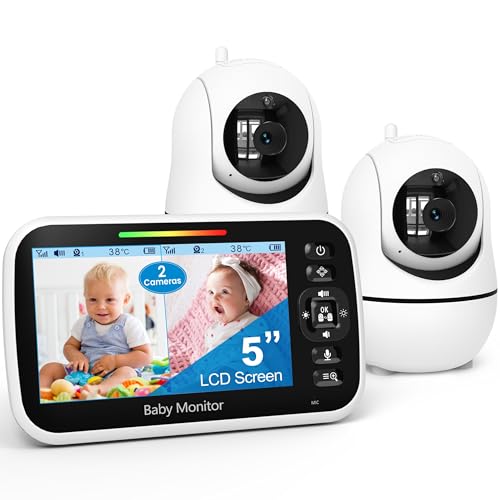
GoodBaby Two-Camera Split-Screen Monitor
What Each Pick Brings To The Table
The VTech VM320 gives an older caregiver both a view and a way to respond without making a home Wi-Fi connection. Its 2.4-inch display is small enough to carry between rooms, which may be more practical for a grandparent than a larger screen.
Its secured 2.4GHz connection uses FHSS, or frequency-hopping spread spectrum, to reduce interference and protect the transmission from unauthorized access. Unlike the GoodBaby No-WiFi Video Baby Monitor, it also includes soothing sounds and a temperature sensor, making it a comfortable all-around nursery tool.
A Few Strong Suits
- The portable 2.4-inch screen suits an older caregiver moving through a house or yard.
- Automatic infrared night vision keeps the room visible without adding bedroom lighting.
- Two-way talk lets you comfort a child from another room.
- Four calming sounds and a temperature sensor support routine nursery care.
Trade Offs
- The fixed camera cannot pan or tilt, so a larger nursery may fall outside its view.
- The stated 1,000-foot range depends on walls, floors, and household interference.
Key Specs
Who It Suits Best
You get a straightforward video system for an older adult caring for a baby in one nearby room.
Where Another Pick Suits Better
GoodBaby Two-Camera Split-Screen Monitor fits caregivers who need to watch two separate rooms at once.
Sometimes sound is all an older relative needs, and the VTech DM1211 keeps that job pleasantly simple. Audio monitoring reduces the amount of screen watching required, which can make the parent unit more comfortable during long periods of childcare.
The stated range reaches 1,500 feet, so it may suit a large home, yard, or multistory property. Its vibrating alert also gives you a discreet way to notice activity without relying on a visible screen.
Benefits That Matter
- Up to 1,500 feet of stated range supports larger homes and outdoor spaces.
- Talk-back lets you soothe a child before walking into the nursery.
- The vibrating alert provides a quiet, screen-free way to notice sounds.
- A soft nursery light adds convenience without taking over the room.
Practical Considerations
- Audio monitoring cannot show you the room or confirm what the child is doing visually.
- Range can shorten considerably through dense walls and multiple floors.
Quick Facts
Made For
You get a simple audio-only setup for an older caregiver who primarily wants to hear the nursery.
Consider Something Else When
VTech VM320 2.4-Inch Video Baby Monitor with Night Vision fits you better when visual confirmation matters.
The Babysense V43 Add-On Camera is for a specific situation: you already own a V43 parent unit and want to watch another room. Pairing up to four cameras creates a split-screen system, which helps an older caregiver follow children in separate spaces from one display.
Its motorized pan and tilt give the view more reach than a fixed camera, while tabletop placement or wall mounting lets you choose the best position. The adjustable night light, lullabies, and white noise add comfort features, although they remain secondary to the camera’s room-expansion role.
Everyday Perks
- Remote pan and tilt let you reposition the view without touching the camera.
- Split-screen viewing makes multiple rooms easier to manage from one parent unit.
Things To Consider
- The V43 monitor is required and is not included with this camera.
- It does not work with Babysense HD S2 systems.
- Your existing V43 must support the stated four-camera arrangement and split-screen display.
Right Fit For
You benefit most from this add-on when a V43 system is already installed and another room needs coverage.
A Better Fit Elsewhere
GoodBaby Two-Camera Split-Screen Monitor gives you a complete two-camera system rather than an accessory for an existing setup.
The ieGeek gives you two ways to monitor a child: a local connection that works without home Wi-Fi and an app mode for checking in through 2.4GHz Wi-Fi. That flexibility may be useful for an older caregiver who stays close to home but occasionally wants access from elsewhere.
Its 5-inch rechargeable parent unit is larger than the VTech VM320 display, while the bendable camera stand can attach to a crib, stroller, or shelf. The camera remains connected to power, so the parent unit carries the freedom of cordless movement.
What Earns Its Place
- The 5-inch display gives you a more detailed view than the VTech VM320.
- Local viewing keeps the everyday setup independent of your home network.
- Remote app access supports checking in from beyond the house.
- The adjustable stand offers more placement choices than a fixed camera.
- Night vision, two-way talk, lullabies, and white noise cover common nursery tasks.
Small Caveats
- Remote viewing requires a compatible 2.4GHz Wi-Fi network and app setup.
- The camera needs continuous power, and an SD card for local storage is not included.
Feature Snapshot
Who Will Love This
You get a feature-rich system for a caregiver who values both a large display and occasional remote viewing.
Skip It When
VTech DM1211 Audio Baby Monitor with Talk-Back suits you better when audio and straightforward controls matter more than video.
A larger screen can make a nursery monitor easier to check at a glance, particularly for an older caregiver who spends part of the day caring for a child. The GoodBaby 5-Inch No-WiFi Monitor combines that display with camera movement, zoom, and a stated 1,000-foot range.
VOX, short for voice-activated operation, lets the system reduce some screen activity when the nursery is quiet. Depending on your household, that behavior may make the monitor less distracting without requiring constant viewing.
Real Benefits
- The 5-inch display provides a clear view without remote app access.
- Camera rotation, tilt, and zoom let you inspect more of a single room.
- Up to 30 hours in VOX mode suits caregivers who need flexible battery use.
Factors To Consider
- The camera covers one room, so another room requires an additional unit.
- Actual range may be shorter in homes with brick walls, appliances, or several floors.
Best Suited To
You get a balanced setup for an older adult monitoring one child in a single room.
Another Choice May Suit
GoodBaby Two-Camera Split-Screen Monitor better serves a caregiver following children in two separate rooms.
The GoodBaby No-WiFi Video Baby Monitor focuses on giving one caregiver control over a single nursery view. Its 5-inch display, 355-degree horizontal rotation, and 120-degree tilt let you scan the room without physically repositioning the camera.
For an older adult, that camera movement may reduce the need to approach the crib to check a blanket, toy, or sleeping position. The rechargeable battery and VOX operation also support a flexible routine, with up to 30 hours stated for VOX use.
Reasons It Performs
- Wide rotation and tilt improve coverage across one nursery.
- The 5-inch screen makes the visual view easier to check.
- No-WiFi operation avoids routine dependence on a home network.
- Two-times zoom helps bring distant details closer.
Details To Watch
- The stated 1,000-foot range may be reduced by walls and household interference.
- This single-camera system does not provide split-screen coverage for another room.
Technical Sheet
Built With In Mind
You get a controllable single-room system for an older caregiver who prefers a larger view without app access.
Reach For A Different Pick When
GoodBaby Two-Camera Split-Screen Monitor fits you better when one parent unit must cover two children.
Two rooms become much easier to manage with the GoodBaby Two-Camera Split-Screen Monitor. Its 5-inch high-definition display shows both camera feeds at once, giving an older caregiver a single place to check two children, siblings, or separate nursery areas.
Audio focus keeps one camera’s sound prominent, while scan mode rotates the audio feed every 15 seconds. That arrangement may suit a caregiver who wants continuous awareness of both rooms without constantly touching the parent unit.
Points In Its Favor
- Split-screen viewing reduces the need for separate parent units.
- Audio focus gives you control over which room you actively listen to.
- Scan mode alternates room audio automatically every 15 seconds.
- The system can expand to as many as four cameras.
Where It May Fall Short
- Alternating audio means you may need to select a camera manually when one room deserves constant attention.
At A Glance
The Right Fit
You get a practical two-room setup for an older caregiver monitoring two children from one display.
Where A Sibling Pick Shines
VTech VM320 2.4-Inch Video Baby Monitor with Night Vision fits a simpler one-room arrangement with soothing sounds.
What To Prioritize In A Baby Monitor For Elderly Care
Start with the level of visibility you actually need. An older caregiver who only needs to hear a nursery may find a compact audio system less distracting, while visual confirmation calls for a larger display. Two-room households benefit from split-screen viewing more than extra settings.
Connection choice also shapes daily convenience. No-WiFi systems keep local operation independent of your home network. Remote app access adds flexibility for travel, but it introduces account setup, network compatibility, and more controls to manage.
Range deserves attention, though the largest stated distance rarely predicts performance inside every home. Walls, floors, appliances, and the placement of both units can shorten the usable distance. Position the camera near the center of the home when you can, and avoid placing the parent unit beside large electronics.
Controls and accessibility deserve a hands-on check. Look for a display size you can comfortably read, a talk-back button you can find quickly, and alerts that do not depend on subtle screen changes. A rechargeable parent unit also needs a charging routine that matches how often the room is monitored.
A Few Details That Change The Decision
Mistakes Worth Dodging
Avoid choosing a camera by range alone, because the placement of walls often matters more than the stated maximum. Also check add-on compatibility before expanding a system, as the Babysense camera only supports the V43 platform. For an older caregiver, extra features are helpful only when they remain easy to operate.
What Separates Premium From Basic
A higher-tier system may add remote access, wider camera movement, larger displays, or multiple-room viewing. Those extras help when your routine genuinely requires them, while a basic audio or single-camera model can be less distracting for straightforward nursery monitoring.
Frequently Asked Questions
Which baby monitor is easiest for an older caregiver?
The VTech DM1211 Audio Baby Monitor with Talk-Back is among the simplest because it concentrates on sound, range, and a vibrating alert. The VTech VM320 is a practical visual alternative for a caregiver who prefers seeing the nursery.
Do I need Wi-Fi for a baby monitor?
Several options operate locally without Wi-Fi, including the VTech VM320, VTech DM1211, and GoodBaby 5-Inch No-WiFi Monitor. The ieGeek system adds a 2.4GHz app mode for remote access.
Which monitor works best for two children?
The GoodBaby Two-Camera Split-Screen Monitor shows two feeds on one 5-inch display. It can expand to four cameras, making it more practical than carrying separate parent units.
Can a baby monitor cover two rooms?
A split-screen system with two included cameras is designed for two-room monitoring. The Babysense V43 Add-On Camera can also extend a compatible V43 setup, but it requires the V43 parent unit separately.
What should an older caregiver look for in a monitor?
Look for a readable display, uncomplicated talk-back controls, audible or vibrating alerts, and a charging routine that fits the household. Range and extra features should support the specific rooms you plan to monitor.
Final Verdict
The VTech VM320 offers the most balanced everyday setup with local video, night vision, talk-back, and soothing audio. The VTech DM1211 suits caregivers focused on sound, while the GoodBaby two-camera system handles two rooms from one display. Match the monitor to your rooms, viewing habits, and comfort with the controls rather than simply choosing the longest range.
