

A living room chair that supports your lower back can still serve as a reading seat, desk chair, or relaxation spot. The right model adjusts to your posture instead of leaving your spine to fend for itself during long workdays, reading sessions, or evening wind-downs. These options come from Hbada, and their shared strengths are adjustable lumbar support, flexible headrests, and reclining frames.
Your living space determines which features matter most. A footrest may suit a dedicated office corner, while a ventilated cushion or automated lumbar system better serves a multipurpose room. A chair can improve your seating setup, though comfort still depends on proper adjustment and individual fit.
A Side-By-Side Look

Hbada E3 Pro Ergonomic Office Chair, 3-Zone Lumbar Support, Black
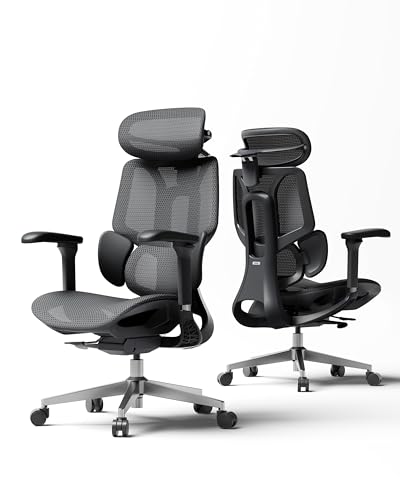
Hbada E3 Air Ergonomic Office Chair, 3-Zone Lumbar Support, Black

Hbada E3 Pro 2026 Office Chair, 3-Zone Lumbar Support, Footrest
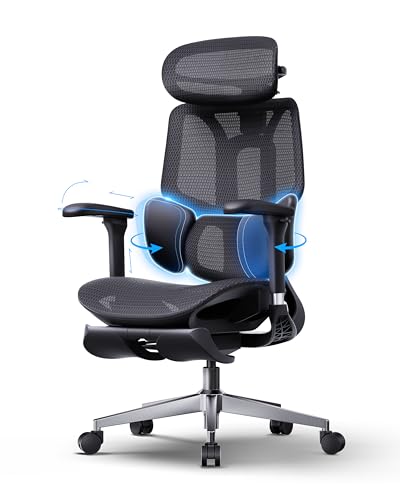
Hbada E3 Air 2026 Ergonomic Office Chair, 3-Zone Lumbar Support, Black
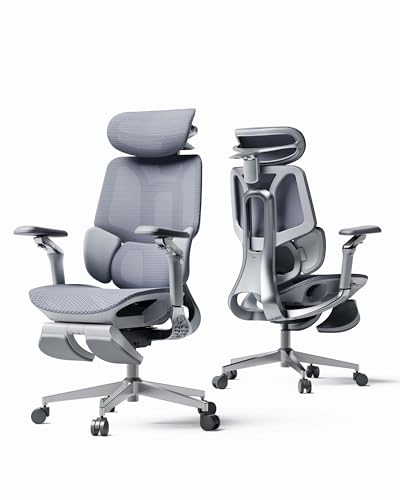
Hbada E3 Pro 2026 Office Chair, 3-Zone Lumbar Support, Grey Footrest

Hbada X7 Smart Ergonomic Chair, Automated Lumbar Tracking, 4D Headrest, Grey

Hbada X7 Smart Ergonomic Chair, Automated Lumbar Tracking, Grey
Why These Options Stand Out
Long desk days leave little room for a seat that barely moves with you. The Hbada E3 Pro counters that with a three-zone lumbar mechanism, a moving massage section, and adjustable warmth around the lower back.
Compared with the E3 Air, this model provides deeper recline positions and a more elaborate set of controls. It suits a living room office where you alternate between focused work, reading, and leaning back during breaks.
Benefits That Matter
- Three-zone lumbar support moves vertically, glides, changes depth, and includes side wings for a closer fit.
- The massage section extends as far as 47 mm, while graphene heating adds a warm seating option.
- Recline positions from 105° to 150° cover upright work through deep relaxation.
- 720° armrests and a dual-axis headrest help place support around your shoulders and neck.
- Breathable mesh spreads pressure, and a 45-minute sitting reminder encourages position changes.
Things To Consider
- The numerous adjustments take time to learn, particularly when moving between work and reclined positions.
- You may prefer a model with a footrest for extended leg support during work.
Quick Facts
Made For
This chair fits people who want extensive controls, warmth, and lumbar massage within a multipurpose living room office.
Look Elsewhere When
Choose the Hbada E3 Air 2026 Ergonomic Office Chair, 3-Zone Lumbar Support, Black when a footrest and automatic recline matter more to you.
A chair that reclines easily matters when your living room doubles as a daytime office. The Hbada E3 Air uses gravity sensing to set its recline resistance, reducing the need to fiddle with a manual tension control.
That hands-off adjustment sets it apart from the E3 Pro, which offers deeper recline angles and massage but a more involved control system. The E3 Air is a sensible middle ground for regular work and reading.
Everyday Wins
- Weight-responsive recline makes the transition from upright work to a relaxed position more consistent.
- Three-zone lumbar support fills the lower-back gap and adjusts as your position changes.
- CloudMesh fabric spreads pressure across the seat during extended sitting.
- Adjustable headrest, backrest, armrests, seat depth, and seat height accommodate different sitting habits.
- The steel base and Class 4 gas lift support a stable desk-chair setup.
Worth Noting
- Its 140° tilt stops short of the 150° position offered by the Hbada E3 Pro.
- The lack of a footrest may matter in a dedicated workstation, depending on your preferred leg position.
Feature Snapshot
Right Fit For
This model suits remote workers and students who want straightforward reclining with broad seat adjustments.
Another Choice May Suit
The Hbada E3 Pro Ergonomic Office Chair, 3-Zone Lumbar Support, Black offers a better fit for people who prioritize massage, heat, and deeper reclining.
Footrests change the feel of a desk chair by giving your lower legs somewhere to settle. This Hbada E3 Pro 2026 Edition adds that feature to a floating lumbar design whose side wings pivot with your torso.
Unlike the automatic-recline E3 Air 2026 model, it focuses on targeted lumbar positioning. You may find that more useful for a fixed desk in a compact study or living room corner.
Key Advantages
- The footrest supports your legs during focused desk sessions without requiring a separate stool.
- Lateral lumbar wings pivot through 40° to 80°, allowing them to follow a forward or reclined posture.
- Vertical lumbar adjustment covers 60 mm to place support across the L1 through L5 region.
- The dual-axis headrest adjusts through 70 mm of depth and 40 mm of height.
Practical Considerations
- The footrest adds length to the setup, so measure the available floor space before choosing.
- The wing and headrest controls take some adjustment, which may be more involved than a simple fixed backrest.
Who Will Love This
This chair suits desk-focused users who want a footrest and precise lumbar positioning in a dedicated work zone.
Reach For A Different Pick When
The Hbada E3 Air 2026 Ergonomic Office Chair, 3-Zone Lumbar Support, Black fits people who favor automatic recline resistance over a manual footrest setup.
A footrest and automatic recline make this E3 Air variant especially practical for a chair that changes roles throughout the day. Its gravity-sensing chassis adjusts resistance to your weight as you move from typing to reading.
Compared with the other E3 Air, this version includes a footrest. Compared with the E3 Pro 2026 Edition, it trades manually positioned lumbar wings for a more automatic reclining experience.
Why It Works Well
- Weight-responsive recline reduces the need to reset a tension control as your body position changes.
- The included footrest gives your lower legs support during concentrated computer work.
- Three-zone lumbar support adjusts through multiple dimensions around the lower back.
- CloudMesh upholstery helps distribute pressure across the seat.
- A 140° tilt supports work, conversation, and a more relaxed evening posture.
Points To Note
- The footrest and reclining frame require adequate clearance behind and beneath the chair.
- Automatic resistance still depends on an appropriate starting setup, so expect a short adjustment period.
The Main Details
Built With In Mind
This model suits home workers who alternate between focused desk tasks and reclined reading in the same chair.
A Better Fit Elsewhere
The Hbada E3 Pro 2026 Office Chair, 3-Zone Lumbar Support, Grey Footrest offers a better fit for people focused on color coordination and adjustable lumbar wings.
Black mesh chairs can disappear into a home office, while a grey finish may blend more comfortably into a living room. This Hbada E3 Pro 2026 Edition keeps that softer look without dropping the footrest or adaptive lumbar system.
Its 40° to 80° side-wing movement and 60 mm vertical adjustment bring more position-specific support than the simpler E3 Air 2026. The trade-off is a more hands-on setup.
Where It Helps
- The grey finish gives you a furniture option that looks less overtly technical in a shared living space.
- Pivoting side wings follow changes between an upright desk posture and a reclined position.
- The footrest provides lower-leg support during sustained computer use.
- The 4D dual-axis headrest moves in both height and depth to align with your neck.
Small Caveats
- You need enough floor space for the extended footrest and reclining position.
- Its detailed lumbar and headrest adjustments may be unnecessary for light, occasional seating.
Essential Details
Whose Shelf It Belongs On
This chair fits style-conscious remote workers who want an office chair that blends into a multipurpose living room.
Where A Sibling Pick Shines
The Hbada X7 Smart Ergonomic Chair, Automated Lumbar Tracking, 4D Headrest, Grey suits people who prefer sensor-assisted lumbar movement to manual wing positioning.
Some sitters move constantly, leaning toward a desk, sitting upright to read, and reclining during breaks. The Hbada X7 uses pressure sensors and an automatic tracking mechanism to reposition its lumbar support as those changes occur.
Unlike the E3 Pro’s manually adjustable massage and heating section, the X7 focuses on responsive movement. It makes sense for a shared living room where different household members use the same chair.
Noteworthy Benefits
- Dual pressure sensors detect changes in your position so the lumbar mechanism can follow along.
- Automatic tracking reduces the need to stop working and manually reposition a lumbar support.
- A ventilated seat cushion encourages airflow during longer periods of sitting.
- The 4D headrest and 720° armrests add upper-body positioning options.
- Swiveling movement makes the chair convenient for reaching different areas of a desk or room.
Where It May Fall Short
- Sensor-driven movement may appeal less to sitters who prefer direct manual control over every setting.
- This listing does not include a footrest, so consider the E3 Pro 2026 versions for dedicated leg support.
The Right Fit
The X7 suits shared spaces and frequent position changes, particularly when more than one person uses the same chair.
Consider Something Else When
The Hbada E3 Pro Ergonomic Office Chair, 3-Zone Lumbar Support, Black offers a better fit for people who want warmth and massage controls.
A reading corner can demand different support from a computer desk, and the Hbada X7 changes its lumbar position as your posture changes. The automated mechanism is paired with a 4D headrest, 720° armrests, and a swiveling frame.
It shares the X7’s sensor-guided approach with the ventilated-cushion model, although this title does not identify that cushion feature. Confirm the seat construction and dimensions before committing to this specific listing.
Practical Advantages
- Automatic lumbar tracking responds to forward, upright, and reclined positions.
- The 4D headrest supports detailed neck positioning for reading and desk work.
- Wide-ranging armrest movement helps keep your shoulders relaxed at different seat heights.
- Swiveling lets you turn toward a side table or another part of the room without moving the whole chair.
Details To Watch
- Check the seat material carefully because this listing title does not name a ventilated cushion.
- Automated lumbar positioning offers less direct control than a manually adjustable three-zone system.
Key Product Details
Who Should Grab It
This chair fits people who use one seat for reading, computer work, and relaxed conversation in a multipurpose room.
Swap It Out When
The Hbada X7 Smart Ergonomic Chair, Automated Lumbar Tracking, 4D Headrest, Grey offers a better fit for shoppers who want the listing to identify a ventilated seat cushion.
What Matters in a Back-Supportive Living Room Chair
Lumbar support should meet the curve of your lower back without forcing a rigid posture. Three-zone systems, floating wings, and sensor-driven tracking each take a different approach, so compare the adjustment range with the way you normally sit. Your own measurements and sitting habits matter more than a feature name.
Recline and headrest movement determine how comfortably the chair changes purpose. A 140° tilt covers moderate relaxation, while the Hbada E3 Pro reaches 150° for a deeper resting angle. Adjustable armrests and a dual-axis headrest keep your shoulders and neck aligned as the backrest moves.
Footrests and footprints deserve equal attention. A footrest can support your lower legs during desk work, yet it also extends the chair’s footprint. Measure the recline clearance and floor space before bringing a model into a compact living room or study corner.
Finally, consider the seat surface. CloudMesh and ventilated cushion designs favor airflow and pressure distribution. The right choice depends on your local climate, clothing preferences, and how long you remain seated.
Shop Smart Around Adjustable Seating
Mistakes Worth Dodging
Focusing only on the lumbar feature can hide a poor fit elsewhere. Check the headrest, armrests, seat height, and recline clearance together, since each affects how the chair supports your body. Measure the room before focusing on a footrest or wide recline position.
What Separates Premium From Basic
Higher-tier models add moving lumbar parts, automated tracking, massage, heat, or wider recline ranges. Those extras make sense for frequent desk work or changing positions, while a simpler adjustable chair may be enough for occasional reading. Pay for the function your routine will actually use.
Frequently Asked Questions
Are these chairs suitable for a living room?
Yes, especially for a living room office, reading corner, or study area. Their office-chair construction provides adjustable support for work and relaxation, although the visual style may be more functional than traditional living room furniture.
Which model has a footrest?
The Hbada E3 Pro 2026 Office Chair, 3-Zone Lumbar Support, Footrest and the Hbada E3 Air 2026 Ergonomic Office Chair, 3-Zone Lumbar Support, Black include footrests. The other listed models do not name one in their titles.
Which chair offers automatic lumbar adjustment?
The Hbada X7 Smart Ergonomic Chair, Automated Lumbar Tracking, 4D Headrest, Grey uses pressure sensors and an automatic tracking mechanism. The E3 models rely on mechanical adjustment instead of sensor-driven lumbar movement.
Which option provides massage and heat?
The Hbada E3 Pro Ergonomic Office Chair, 3-Zone Lumbar Support, Black includes an extending massage section and graphene heating. Those features are not identified in the other product titles.
How much floor space should I allow?
Allow enough room for the seat, reclining frame, and any extended footrest. Measure the chair’s available footprint and your intended recline position, especially in a narrow living room or compact work area.
Final Thoughts
The Hbada lineup covers several distinct seating priorities. Choose the E3 Pro for massage, heat, deeper reclining, or targeted lumbar wings; pick the E3 Air for weight-responsive reclining; and consider the X7 when automatic lumbar tracking matches your frequently changing posture. Match the footrest, finish, and floor space to your room before making the final call.
