

The right blue light blocking glasses for computer use can make long workdays feel more comfortable, especially when text, spreadsheets, and video calls demand constant focus. The seven options below range from flexible frames for children to magnified readers and nearly clear lenses designed to preserve color accuracy. Your best choice depends on magnification, frame comfort, screen habits, and who will wear the glasses.
A Side-By-Side Look

AIMISUV 5-Pack Blue Light Readers

JUSLINK Kids Blue Light Glasses

Eyekepper 1.5 Blue Readers 5-Pack

ANRRI Lightweight UV400 Blue Light Glasses
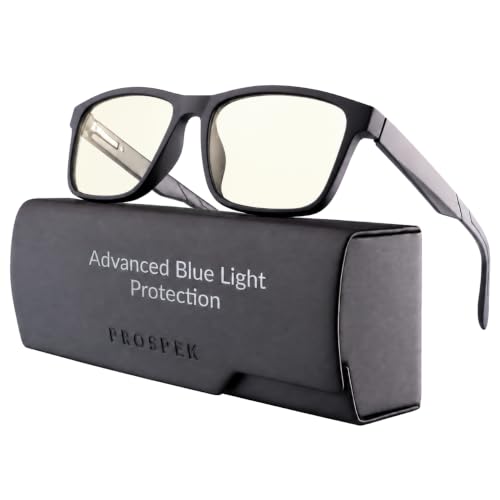
Prospek Blue Light Readers

Prospek Computer Glasses

BLUEMOKY Sport Square Blue Light Readers
More On The Choices That Made The List
AIMISUV makes the most sense when several people need close-up help at the same desk or around the house. The five-pair set includes varied styles, colors, and diopter options, where a diopter is a measure of lens magnification. You can keep different strengths beside the computer, reading chair, or craft table without passing around one pair.
Compared with the single-strength Eyekepper readers later in the list, this set gives you more flexibility, although the exact strength assigned to each pair deserves attention. The processed lenses are intended to provide a clear magnified view for books, crafts, labels, and other detailed work.
Useful Touches
- Five pairs make the set practical for shared desks, travel, or multiple reading spots.
- Varied colors and frame styles give you more freedom to match different preferences.
- Magnification options support close work without making every pair identical.
Trade Offs
- Check the listed diopter and color for each pair before distributing them, since the strengths can differ.
- A five-pair assortment may be more than you need for a single computer station.
Key Specs
Who It Suits Best
You benefit most from this set if you read at a shared computer or need several magnification strengths around the home.
Consider Something Else When
Eyekepper 1.5 Blue Readers 5-Pack suit you better when every pair should have one predictable magnification strength.
School homework, tablets, and video games give children plenty of reasons to wear screen glasses for long stretches. JUSLINK targets ages 3 through 12 with a flexible, resilient frame that should better tolerate the grabbing, dropping, and constant movement that comes with younger users. The low-weight design also makes extended wear more practical during lessons or play.
Unlike the adult reader options elsewhere in this roundup, these glasses prioritize a playful pink-and-turquoise appearance rather than magnification. That makes them better suited to children who need screen filtering but have not reached the point of using reading-strength lenses.
A Few Strong Suits
- The flexible frame is well suited to children who move around while wearing glasses.
- Lightweight construction reduces the heavy feeling associated with some adult frames.
- Bright colors may make the glasses easier for children to accept during homework or screen time.
Small Caveats
- Check the fit on a smaller face, especially for children near the youngest end of the stated age range.
- These are not magnified readers, so children with close-up vision needs should consider a separate reading option.
Built With In Mind
These glasses suit parents looking for a flexible, colorful frame for children who use tablets, computers, and televisions regularly.
A Better Fit Elsewhere
JUSLINK Kids Blue Light Glasses suit younger children better than AIMISUV 5-Pack Blue Light Readers, which are designed for magnification and shared household use.
Eyekepper’s 1.5 strength is a practical middle ground for small print and close-up details. A diopter of 1.5 magnifies nearby text more noticeably than a mild reader while remaining less intense than stronger options. The rectangular lenses suit books, menus, product labels, sewing patterns, model kits, and phone screens held near your face.
Spring hinges and flexible temples add everyday wearing value, particularly across long reading sessions. Compared with the varied-strength AIMISUV set, this five-pack keeps the magnification consistent, which can make it easier for you to keep one pair at the desk and another in a travel case.
Bright Spots
- The defined 1.50 diopter strength helps with small print without moving between multiple power levels.
- Five pairs suit separate desks, bags, or household locations.
- Spring hinges allow the temples to flex rather than forcing a rigid fit on every face.
- The understated rectangular shape works with both casual and professional clothing.
Points To Note
- Confirm that 1.50 diopters match your close-up needs before ordering.
- Blue-light filtering supports screen comfort but does not replace prescription lenses or an eye examination.
Feature Snapshot
Made For
You benefit most from these readers when small print, detailed crafts, and close-up phone viewing are routine tasks.
Another Choice May Suit
Prospek Blue Light Readers offer a better fit when you need a choice between 1.25 and 1.75 diopters rather than one fixed strength.
Long screen sessions call for a frame you can forget you are wearing. ANRRI uses lightweight TR material, a plastic type often chosen for eyewear because it balances low weight with flexibility. The lenses filter blue-violet light from phones, computers, and tablets, while UV400 coverage also makes them relevant for commuting in daylight.
Unlike the magnified reader glasses in picks 1 and 3, this pair focuses on screen filtering without adding close-up power. That makes it a straightforward option for office work, gaming, browsing, and reading on a monitor.
Advantages To Know
- Lightweight TR construction suits long periods of computer use.
- Blue-violet filtering targets light commonly emitted by digital screens.
- UV400 coverage adds value for daily travel and indoor environments near bright windows.
Practical Considerations
- Check the frame width and temple fit, since lightweight material does not guarantee a universal fit.
- UV400 adds broader daylight coverage, but it is less central to shoppers focused only on office screens.
Technical Sheet
The Right Fit
These glasses suit you best when all-day lightness matters more than reading magnification.
Reach For A Different Pick When
Eyekepper 1.5 Blue Readers 5-Pack suit you better when close-up text appears uncomfortable without magnification.
Prospek gives you a more specific choice than the single-strength Eyekepper set. You can select 1.25 or 1.75 diopters, letting you match the glasses more closely to your close-up needs. The near-clear lens is designed to filter blue light in the 400 to 455 nanometer range while limiting visible color distortion.
Eight coatings add another layer to the design, including anti-glare and smudge resistance. Those finishes can be useful during office work or video calls, where reflections and fingerprints otherwise compete with screen content.
The Helpful Details
- Two diopter choices provide a clearer starting point for different reading demands.
- Anti-glare coating can reduce distracting reflections on a monitor.
- Smudge resistance helps maintain a clear view during frequent touchscreen use.
- The nearly clear lens keeps color perception closer to an unfiltered screen.
What To Weigh
- Your magnification choice must match your close-up needs, so check the selected strength carefully.
- Coatings support clarity but do not change the underlying optical power.
Quick Facts
Who Will Love This
You benefit most from these glasses when you combine close-up reading with color-sensitive computer work.
Where A Sibling Pick Shines
Prospek Computer Glasses suit you better when you need screen filtering without any magnification.
Color accuracy becomes important when your screen shows edited photographs, design layouts, product colors, or video calls. Prospek Computer Glasses use a nearly clear lens that filters a portion of the strongest blue light from monitors, phones, and tablets while keeping color distortion low. That makes them more compelling for visual work than a heavily tinted lens.
Compared with Prospek Blue Light Readers, this option stays focused on screen use rather than adding magnification. Its family of work-and-office frame styles also gives you a chance to choose a shape that suits your face and daily setting.
What Earns Its Place
- Low color distortion supports color-sensitive work and everyday viewing.
- The near-clear approach suits offices, studying, and general screen time.
- Several frame styles provide more freedom to match your preferences.
Areas To Watch
- Choose carefully among the frame and lens options available in the listing.
- This choice offers screen filtering without the close-up magnification found in the Prospek reader model.
Made For
These glasses suit you best when accurate-looking colors matter during frequent monitor-based work.
Swap It Out When
Prospek Blue Light Readers suit you better when you also need magnification for books, labels, or close-up objects.
BLUEMOKY takes a more directional approach with a sporty square frame aimed at men. The dark, structured shape is designed to complement a casual wardrobe, while the reading-glass format adds close-up assistance for phone use, printed material, and detailed desk tasks. Anti-glare treatment helps keep reflections from competing with what you are viewing.
Unlike AIMISUV’s varied assortment, this model emphasizes one recognizable silhouette rather than multiple colors and strengths. You may find that sharper styling more useful for commuting and quick screen checks, especially in a home office that favors a sportier look.
Real-World Strengths
- The square frame gives you a bolder alternative to slim rectangular readers.
- Anti-glare treatment suits phones, monitors, and reflective paper.
- The reading format supports both close-up print and nearby screen work.
Less Ideal Details
- Verify the selected magnification strength before ordering.
- The distinctive square shape may not suit every face shape or personal style.
Details At A Glance
Whose Shelf It Belongs On
These glasses suit you best when you want reading assistance in a bold, casual frame suited to men.
Look Elsewhere When
JUSLINK Kids Blue Light Glasses suit you better when the wearer is a young child who needs a flexible, playful frame.
How to Match Glasses to Your Workday
Establish Your Vision Need
Start by separating screen filtering from reading magnification. Standard computer glasses filter blue-violet light without changing how closely you see, while readers add optical power for nearby text. A 1.5 diopter provides moderate magnification, and choosing too much or too little can make close work feel uncomfortable.
Consider Lens Clarity
Lens color affects how naturally your screen looks. A nearly clear lens can help maintain color accuracy during design work, photo editing, and video calls, while stronger tints may be more noticeable. Anti-glare and smudge-resistant coatings can also matter when you touch your glasses or work near reflective monitors.
Check Frame Comfort
The frame influences whether you wear the glasses consistently. Lightweight TR suits long computer sessions, while flexible children’s frames are better suited to active younger users. Spring hinges can accommodate changing head positions, and you should still compare the lens width, bridge, and temple length with your face.
Match the Set to Your Routine
A single pair works for one regular workstation. Multiple pairs help with travel, shared desks, different vision needs, or households where several people use the same style. Kids need age-appropriate proportions, and adults with close-up needs should confirm the diopter before ordering.
Two Details That Change the Decision
Common Shopping Slip Ups
A common mistake is treating all blue-light glasses as the same. Screen-only models and magnified readers serve different tasks, so check whether you need optical power. Another mistake is ignoring fit, especially for children or all-day wear, because a comfortable frame is more likely to become part of your routine.
What The Higher Tier Buys
A higher-priced pair may spend more on lens coatings, frame material, and optical refinements. Those additions matter most when you work long hours, notice reflections, or need dependable color accuracy. For occasional use, a simpler frame with the correct magnification may be enough.
Frequently Asked Questions
Do blue light blocking glasses need a prescription?
No, non-prescription screen glasses can be worn on their own, while reading-strength versions add magnification. You still need prescription lenses for vision correction.
Are computer reading glasses the same as regular readers?
No, regular readers mainly magnify close-up text. Computer reading glasses combine that magnification with blue-light filtering for nearby screens.
Which diopter strength works best for computer use?
A 1.5 diopter is a common moderate choice for small print and phones, though your own vision determines the right level. You can compare 1.25 and 1.75 options or have an eye-care professional confirm your needs.
Are blue light glasses suitable for children?
Children can use screen-filtering glasses designed for their age range. JUSLINK’s flexible frame is intended for ages 3 through 12, but you should still check the fit and monitor screen habits.
Can blue light glasses stop screen-related headaches?
They may improve comfort by reducing glare and blue-violet light, but they do not diagnose headaches or replace medical care. Persistent discomfort deserves attention from a qualified eye-care professional.
Final Verdict
Your best choice comes down to daily habits. Pick magnified readers for close-up work, a lightweight frame for long screen sessions, a flexible model for children, or nearly clear lenses when color accuracy matters. Check magnification and fit before ordering, then choose the pair you will feel comfortable wearing consistently.
