

Long computer sessions can leave your eyes feeling tired, your vision temporarily blurry, and your glasses in desperate need of a cleaning. The right blue light blocking glasses can reduce screen glare and make close-up work more comfortable, whether you’re handling homework, spreadsheets, design files, or evening gaming.
A Quick View Of The Lineup

CHEERS DEVICES Kids Blue Light Glasses Ages 2-18

Eyekepper 1.5 Readers 5-Pack

Okany Kids Anti-Glare Blue Light Glasses 3-Pack, Ages 3-12

JFXQDR Cat Eye Glasses
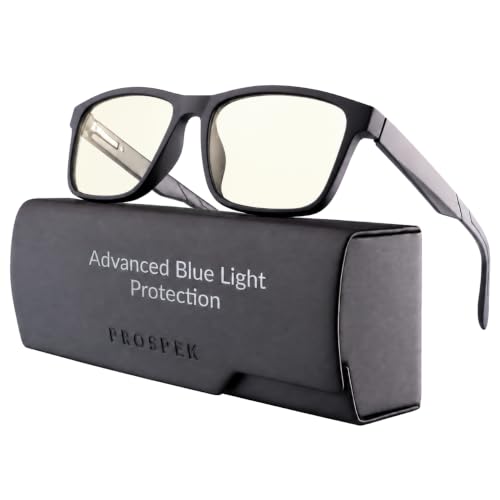
Prospek 1.25/1.75 Readers

Prospek Computer Glasses

BLUEMOKY Sport Square Reading Glasses
A Breakdown Of The Leading Choices
Screen time tends to follow children everywhere, from a tablet during a long car ride to a computer used for homework. These CHEERS DEVICES glasses use a lightweight TR90 frame intended for ages 2-18, with soft nose pads and a playful non-prescription shape that may feel less like medical eyewear.
Unlike the multi-frame set from Okany, this model centers on a single child-friendly design with a UV400 designation and anti-glare lenses. The included blue-light check lamp and card give you a simple way to check the lens filtering, though a child’s facial proportions remain the deciding factor.
What Pays Off
- TR90 construction gives the frame a flexible, lightweight feel during long play or study sessions.
- UV400 and anti-glare features suit phones, tablets, computers, and television viewing.
- Soft nose pads can improve comfort for children who wear glasses throughout the day.
- The check lamp and card add a practical way to evaluate the blue-light filtering.
Small Caveats
- The stated age range is broad, so check that the frame sits securely on smaller faces.
- These are non-prescription fashion glasses rather than a substitute for corrective eyewear.
Key Specs
Built With In Mind
These glasses suit children who regularly use screens for schoolwork, gaming, video calls, or entertainment.
A Better Fit Elsewhere
Choose Okany Kids Anti-Glare Blue Light Glasses when you want three frame colors for children aged 3-12.
Keeping a pair in your work bag, another beside the monitor, and a third near the kitchen table can prevent the familiar scramble for glasses. Eyekepper includes five pairs of 1.5-diopter reading glasses, making this a convenient choice for offices, home workspaces, and shared homes.
A diopter measures lens power, so 1.5 provides moderate close-up magnification for small print without turning the frame into a thick reading pair. The rectangular design, spring hinges, and blue-light filtering make these more useful for screen-based reading than a conventional pair of readers.
Noteworthy Benefits
- Five pairs allow you to place glasses where you actually read or work.
- The 1.50 diopter strength supports books, menus, labels, and small screen text.
- Spring hinges allow the temples to flex rather than press rigidly against the head.
- Blue-light filtering reduces glare during extended computer use.
Things To Consider
- The 1.50 strength is intended for close-up work and will not provide distance vision.
- Magnifying lenses can make a monitor look slightly smaller, so a larger display remains easier to view.
Quick Facts
Who Will Love This
This set works for adults who divide reading and computer time between several rooms or work locations.
Another Choice May Suit
Prospek 1.25/1.75 Readers offer a better fit when you need a choice between two magnification strengths.
Three frames solve more than a single-pair shortage: one can stay with a child, another can travel, and the third can remain beside a shared computer. Okany includes black, transparent blue, and transparent frames, giving children some choice in a category where appearance can determine whether they actually wear the glasses.
The anti-glare and UV protection features suit children moving between a television, tablet, phone, and desktop display. Compared with the CHEERS DEVICES model, the main advantage here is variety rather than a different age band, and the stated range stops at age 12.
Positive Takeaways
- Three pairs provide useful options for school, home, and travel.
- Different frame colors make it easier for children to choose a pair they like.
- Anti-glare lenses suit several common household screen types.
Points To Note
- Check the fit carefully because the listed range covers children from age 3 through 12.
- The three-pack does not address the need for a specific reading magnification.
Made For
These glasses suit families with children aged 3-12 who move frequently between several digital devices.
Where A Sibling Pick Shines
CHEERS DEVICES Kids Blue Light Glasses Ages 2-18 are the broader choice for a child who may need them beyond age 12.
An oversized cat-eye frame can change the look of an entire outfit, which makes these glasses appealing for video calls, creative work, or an office where eyewear forms part of your personal style. JFXQDR pairs that silhouette with clear lenses designed to reduce screen glare.
The double-sided OAR coating is listed at 98% light transmittance, which helps preserve an open, bright view of the display. The anti-oil, waterproof, anti-fog, scratch-resistant, UV-protective, and anti-glare coatings add everyday usefulness, although the dramatic shape may suit only some face shapes.
Points In Its Favor
- The cat-eye silhouette gives office eyewear a noticeable fashion accent.
- High light transmittance supports a clear view of text and graphics.
- Anti-oil and scratch-resistant coatings suit frequent handling.
- Anti-fog and waterproof properties add practicality around changing temperatures.
Less Ideal Details
- The oversized shape may sit differently than a narrow rectangular frame.
- This design offers no reading magnification for close-up documents.
Technical Sheet
Right Fit For
These glasses suit adults who want screen filtering in a frame that complements office, evening, or video-call attire.
Reach For A Different Pick When
Prospek Computer Glasses make more sense for digital work where color accuracy and a near-clear lens matter more than a bold cat-eye shape.
Magnification becomes useful when fine text starts to feel like a problem during a spreadsheet, product label, or recipe on a phone. Prospek offers 1.25- and 1.75-diopter versions, giving you a moderate or stronger close-up option depending on how much help you need.
The nearly clear lens filters light in the 400-455nm band and includes eight coatings, including anti-glare and smudge resistance. That low-distortion approach is more useful for color-sensitive work than the more noticeably tinted appearance some blue-light glasses can have.
Useful Highlights
- Two magnification strengths provide more fitting options than a single-power pair.
- The near-clear lens helps maintain accurate-looking screen colors.
- Anti-glare and smudge-resistant coatings suit daily computer handling.
- Optical-grade lenses support clear viewing during close work.
Possible Compromises
- Magnified text can make a compact phone screen harder to navigate.
- Stronger magnification is better reserved for stationary close-up tasks.
Feature Facts
Who It Suits Best
These glasses suit adults who divide their day between small print and computer displays and want adjustable close-up power.
Not Your Match When
JFXQDR Cat Eye Glasses are the stronger fit for someone focused on fashionable office eyewear without reading magnification.
Color accuracy becomes important when a monitor displays photographs, illustrations, videos, or interface elements. These Prospek computer glasses use a near-clear lens designed to filter the strongest blue light while keeping color distortion low, making them a sensible choice for office and creative work.
The style range includes Wayfarer, Cat Eye, Aura, Era, Carbon, Velari, Shadow, Dynamic, and Pro frames, giving you more freedom to match office clothing and personal taste. Unlike the JFXQDR model, the emphasis is on a subdued screen experience rather than a bold oversized silhouette.
Features That Help
- Low color distortion supports detailed work on visual content.
- The near-clear lens preserves an ordinary view of the display.
- Multiple frame styles make it easier to coordinate with your clothing.
Details To Watch
- Confirm the selected frame size and shape suit your face comfortably.
- These computer glasses do not provide close-up reading magnification.
The Right Fit
These glasses suit office professionals, students, and creators who need clear colors while working across several digital devices.
Swap It Out When
Choose BLUEMOKY Sport Square Reading Glasses instead when your priority is close-up reading in a sporty square frame.
A square sports frame gives these glasses a more active, casual look than the slim rectangular frames common in office settings. BLUEMOKY combines that shape with reading and computer functions, which makes them an interesting option for men who want one frame to handle menus, phone text, and monitor work.
Anti-glare computer lenses help manage reflections around a desk, while the square frame should offer a distinctive alternative to round or cat-eye styles. The important purchase check is the reading strength, since different levels of magnification can change how comfortably you view small print.
Strong Points
- The sporty square silhouette stands apart from conventional office readers.
- Anti-glare lenses suit computer work and brightly lit desks.
- Reading and computer functions serve several everyday viewing needs.
Where It May Fall Short
- Confirm the reading strength and temple length before ordering.
- The sporty shape may not suit an office with a conservative dress code.
Core Details
Best Suited To
These glasses suit men who want casual styling and close-up reading in one square frame for work and daily use.
A Better Fit Elsewhere
Prospek 1.25/1.75 Readers are the better choice when choosing between two magnification levels matters most.
What Matters Before You Settle on a Pair
Magnification serves a specific purpose
Magnified lenses are valuable for books, labels, menus, and close-up phone text. A diopter describes the degree of added focusing power, so a higher number produces stronger magnification, but it can also make a compact screen harder to navigate.
Lens tint affects your display
A nearly clear lens can reduce blue-light filtering while keeping screen colors looking more natural. Darker or more obvious tints may make glare reduction more noticeable, but color distortion can become distracting during design, photography, or video work.
Fit matters across long sessions
Pay attention to frame width, nose-pad comfort, and temple flexibility. You also need to decide whether the style suits your face, whether a child can wear the frame securely, and whether the frame remains comfortable through a full workday.
Common Mistakes Worth Avoiding
Choosing by color alone
A blue tint does not tell you how much magnification you need. Check the lens power and intended viewing distance first, then consider appearance.
Assuming every screen requires the same frame
Reading, gaming, design, and general office work place different demands on a lens. A near-clear computer frame is more useful for color work, while magnifying glasses suit close-up text.
What Separates Premium From Basic
Coatings and optical clarity
Higher-tier frames may add anti-glare, anti-oil, anti-fog, scratch resistance, and low-distortion lenses. Those upgrades matter most for people who handle glasses frequently or work with detailed, color-sensitive content.
Choosing the right power early
Spending more only helps when the added feature matches your routine. A coated, non-magnifying frame can be more useful than a basic pair with the wrong reading strength.
Frequently Asked Questions
Do blue light blocking glasses help with computer eye strain?
They can reduce glare and blue light reaching your eyes, which may make long screen sessions more comfortable. Screen breaks, sensible display settings, and regular blinking remain useful parts of a healthy computer routine.
Are blue light glasses necessary for children?
They are optional, but they can provide glare reduction for children who spend time on tablets, televisions, phones, and computers. Fit, comfort, and the child’s willingness to wear the frame matter more than treating the glasses as a cure for screen discomfort.
Can blue light glasses replace prescription glasses?
No. Non-prescription blue-light frames filter light but do not correct nearsightedness, farsightedness, or astigmatism.
Which lens tint is best for computer work?
A nearly clear lens is often easier to live with for extended office sessions because screen colors remain more natural. A darker tint may be more noticeable, so the best choice depends on your work and sensitivity to glare.
Should I choose reading glasses or plain computer glasses?
Choose reading glasses for menus, printed material, and close-up phone text. Plain computer glasses are better suited to viewing a monitor at normal distance without added magnification.
Final Thoughts
The right pair depends on who wears it and what happens during the day. Children need a secure, comfortable fit, close-up workers need the correct magnification, and creative professionals may prefer a clear lens that preserves color accuracy. Match the frame to the task first, then let style and coatings narrow the field.
