

A call button can give an older adult a direct way to request help from a nearby caregiver, while app-based systems can also alert family members who are away. The right setup depends on where the caregiver stays, how quickly a response must arrive, and whether monitoring support belongs in the plan.
The Picks In Brief

Daytech WiFi Caregiver Call Button, Button and Wrist

liotoin Caregiver Pager, 3 Call Buttons, 2 Receivers

AIDA Wireless Caregiver Pager, 2 SOS Buttons, 1 Receiver

Medical Guardian MGMini Medical Alert Device, Black

CallToU WiFi Caregiver Pager, 1 Button, 1 Watch
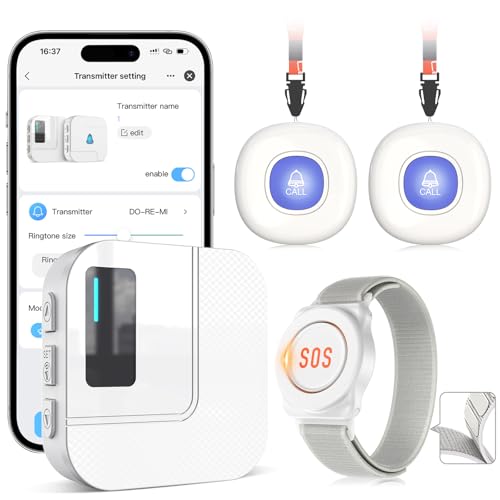
CallToU WiFi Caregiver Pager, 2 Buttons, 1 Watch

Medical Guardian MGMini Medical Alert Device, Rose Gold
The Picks, Examined More Closely
The Daytech system is built for a caregiver who cannot remain within earshot of the person who needs help. Pressing either the call button or wrist-worn control triggers the receiver and sends an alert through the mobile app, which is useful when you are working, running errands, or resting elsewhere in the home.
Shared notifications make this a practical choice for relatives who divide caregiving duties. Compared with the local-only systems later in the list, its main advantage is the ability to keep family members informed away from home, though internet access remains central to app delivery.
Where It Helps
- Button and wrist options support both bedside and wearable use.
- Shared app alerts keep several family members informed.
- Twenty ringtone choices and five volume levels make alerts easier to distinguish.
- Phone and text delivery can carry alerts when the internet is unavailable.
- The receiver, button, and watch offer more than one way to request assistance.
Practical Considerations
- App setup and notification permissions add more configuration than a simple plug-in receiver.
- The listed 150-meter operating range varies with walls, floors, and home layout.
Key Specs
Built With In Mind
This fit suits family caregivers who need remote notifications and can manage the mobile app setup.
Where A Sibling Pick Shines
The liotoin Caregiver Pager, 3 Call Buttons, 2 Receivers suits households wanting two local receivers without app-based remote alerts.
Two plug-in receivers give the liotoin system a useful place in a home with separate care areas. One receiver can sit upstairs while another remains downstairs, and the three push buttons can be carried on a neck, kept in a pocket, or placed near a kitchen or washing area.
This arrangement works well for relatives living in the same house, especially in a home where the person who needs help moves between rooms. Unlike the Daytech system, it focuses on local sound alerts rather than sending notifications through a caregiver’s mobile app.
Advantages To Know
- Two receivers can cover separate floors or activity areas.
- Three buttons support bedside, pocket, and room-side placement.
- Four volume levels and a silent flashing mode suit different spaces.
- Each receiver can pair with as many as 36 transmitters.
- The remembered chime setting survives a power interruption.
Trade Offs To Consider
- Both receivers need accessible electrical outlets.
- The 600-foot figure describes an open-area range, while walls and floors can reduce it.
- Remote family members do not receive the app alerts offered by Wi-Fi systems.
Feature Snapshot
Made For
Large family homes with two caregivers or two distinct levels benefit most from the dual-receiver layout.
Another Choice May Suit
The CallToU WiFi Caregiver Pager, 2 Buttons, 1 Watch better fits caregivers who also need app notifications away from home.
The AIDA pager gives a caregiver a generous selection of alert sounds, which can be helpful when several household members need to recognize the call. Its two SOS buttons can hang from a lanyard or be secured in a bathroom or bedroom, while the single receiver stays wherever help is usually provided.
Compared with the liotoin package, this set trades a second receiver for wider sound selection. That makes it a sensible fit for one primary caregiver who wants distinct tones for different buttons or rooms, although exact reception can shift with the home’s construction.
Noteworthy Benefits
- Fifty-eight chime choices make call sources easier to identify.
- Five volume levels accommodate different hearing needs.
- Two lanyard buttons can be worn or installed in separate rooms.
- The receiver can move between the bedroom, kitchen, or yard.
Points To Keep In Mind
- Only one receiver is included, so a second caregiver cannot hear it in another area without another unit.
- The stated 600-foot range is most realistic in open areas.
- Each button uses a CR2016 lithium battery that must be replaced eventually.
Quick Facts
Right Fit For
One primary caregiver who wants many recognizable tones and portable call buttons gets the most from this package.
Look Elsewhere When
The liotoin Caregiver Pager, 3 Call Buttons, 2 Receivers serves homes better when alerts must sound in two separate areas.
The Medical Guardian MGMini takes a different approach from the caregiver pagers. It is a compact personal alert device with an SOS button, emergency location assistance, and a two-way speaker that connects the wearer with a monitoring team during an emergency.
That design makes sense for an older adult who spends time alone and wants support beyond the reach of a receiver in another room. The black finish is understated, while the included lanyards and belt clip allow you to choose whether the device is worn around the neck or carried more discreetly.
A Few Highlights
- Two-way voice communication allows a monitoring team to speak with the wearer.
- Emergency location assistance adds context beyond a simple in-home receiver.
- Round-the-clock monitoring support serves people who live alone.
- Lanyard and belt-clip options support different daily routines.
Worth Noting
- A subscription is required for service.
- The monitored-service format carries an ongoing cost that a one-time pager does not.
Who Will Love This
An active older adult who lives alone and wants both emergency contact and location assistance fits this monitored format.
Reach For A Different Pick When
The Daytech WiFi Caregiver Call Button, Button and Wrist is more appropriate for relatives managing notifications through a shared app.
The CallToU set keeps its local receiver compact while adding app-based remote access through a home Wi-Fi connection. Pressing the call button or watch control triggers a loud receiver alarm with flashing lights, and the system can also send an emergency alert through the app.
With one button and one watch, this package fits a single-person arrangement in a typical home. The radio signal covers about 328 feet or 100 meters, while the receiver reaches family members through 2.4 GHz Wi-Fi, a frequency used by many home routers.
Why It Works Well
- The watch gives the wearer a discreet way to request assistance.
- Loud sound and flashing lights provide two local alert cues.
- App access lets relatives receive alerts outside the immediate home.
- The compact receiver avoids requiring a dedicated monitor on a desk.
Small Caveats
- The receiver requires a 2.4 GHz Wi-Fi network and cannot connect to 5 GHz Wi-Fi alone.
- Remote app notifications depend on a working internet connection.
- Thick walls can reduce the stated 100-meter radio range.
Important Details
Made For
A small household with one older adult and one primary app-using caregiver suits this compact configuration.
Consider Something Else When
The CallToU WiFi Caregiver Pager, 2 Buttons, 1 Watch gives a larger home more fixed call points around the property.
The two-button version expands the CallToU setup without adding another receiver. One call button can stay beside the bed, the second can sit near a chair or another frequently used area, and the watch provides a wearable option for movement around the home.
It shares the same 100-meter radio coverage and 2.4 GHz app connection as the smaller set. For a caregiver managing a larger floor plan, the extra call point may prove more useful than another watch, though the receiver’s location still influences how quickly the alert is heard.
The Upside
- Two fixed buttons support placement in separate everyday areas.
- The watch adds mobility without requiring another wall-mounted station.
- Flashing lights supplement the receiver’s audible alarm.
- App alerts can reach relatives beyond the home.
Where It May Fall Short
- One receiver means only one local alarm unit.
- The network must provide 2.4 GHz Wi-Fi.
- The stated radio distance may fall short in homes with dense walls.
Best Suited To
Caregivers who want separate bedside and living-area call points benefit from the two-button arrangement.
Swap It Out When
The liotoin Caregiver Pager, 3 Call Buttons, 2 Receivers is a better fit when alerts must sound in two separate home areas.
The rose-gold Medical Guardian MGMini serves the same monitored role as the black version, with an SOS button, emergency location assistance, and a two-way speaker for contacting the response team. Its lighter finish may feel more approachable for someone who does not want an alert device to look overly clinical.
You can wear the device with the included lanyards or carry it with the belt clip, which adds flexibility for different outfits and routines. As with the black model, a subscription is part of the service, and the advantage comes from having an organized monitoring response rather than relying on a caregiver nearby.
Well-Handled Touches
- Rose-gold coloring gives the device a softer, more personal appearance.
- The SOS button opens a connection to a 24/7 monitoring team.
- Two-way speech lets the wearer communicate directly during an alert.
- Location assistance supports response when the person is away from home.
- Lanyards and a belt clip allow two carrying styles.
Things To Weigh
- The subscription requirement creates an ongoing service expense.
- This option costs more than a basic local pager because it includes a monitored service.
Core Details
Whose Shelf It Belongs On
A style-conscious older adult who lives alone and values discreet monitored assistance fits this color choice.
A Better Fit Elsewhere
The Daytech WiFi Caregiver Call Button, Button and Wrist suits family members who want shared app alerts without a monitoring subscription.
What to Match Before You Buy
Caregiver location and alert delivery
A nearby caregiver can be reached with a local receiver and sound alert. Remote relatives benefit more from app, phone, or text notifications, so your household’s communication pattern matters more than the number of buttons alone.
Range and building layout
The stated range represents a signal-distance estimate, not a promise of identical reception in every building. Thick walls, floors, appliances, and closed doors can reduce coverage, making room placement and a test of the completed setup especially important.
Wearable versus fixed buttons
A wrist device suits someone who moves around the home, while a fixed button is convenient beside a bed, chair, or bathroom entrance. A combined package offers more placement options but adds devices that need charging or battery changes.
Monitoring service or local system
A monitored personal alert device provides a trained response team and location assistance, but it requires a subscription. A local pager has simpler ownership and keeps the alert inside the home, making it better for relatives who already live nearby.
Common Pitfalls in Home Alert Choices
Wrong Turns To Avoid
A long listed range does not guarantee clear reception through every wall. Check the router band, receiver placement, and button locations before expecting alerts to work in each room.
Where The Extra Money Goes
A monitored device adds organized 24/7 support, two-way communication, and location assistance beyond a basic local receiver. That upgrade makes sense for someone living alone, while a nearby caregiver may find a simpler pager sufficient.
Frequently Asked Questions
Which emergency call button works best for someone living alone?
A monitored personal alert device offers the broadest response structure for someone living alone. A Wi-Fi caregiver pager may suit an arrangement where relatives share app alerts and can respond promptly.
Are Wi-Fi caregiver pagers suitable for nighttime use?
A receiver with adjustable volume and flashing lights can provide a useful nighttime cue. Place it where its sound and light can be noticed without creating unnecessary disturbance.
How many call buttons does a larger home need?
The right count depends on where the person rests, moves, and spends time. Two buttons may cover a bedroom and living area, while three buttons can serve additional rooms.
Do these systems work through multiple floors?
Signal reception depends on distance, walls, floors, and equipment placement. A receiver on each level can improve coverage in a large home, while wireless range alone does not guarantee reception.
What is the difference between a call button and a medical alert device?
A caregiver call button sends an alert to a receiver, app, phone, or text contact. A medical alert device connects the wearer with a monitoring team and may provide location assistance.
Final Thoughts
The right emergency call button for an elderly relative depends on who must respond and where that person will be. Local pagers suit nearby caregivers, Wi-Fi systems add remote notifications, and monitored devices provide a structured response channel for seniors living alone. Match the setup to the home and daily routine rather than choosing on button count alone.
