

A communication aid should make everyday interactions easier without adding another complicated system to manage. You may be comparing typed speech devices, large-key keyboards, picture buttons, and emergency alert wearables for a family member, adult, or senior. The right fit depends on typing ability, vision, hand control, vocabulary needs, portability, and how much setup you can realistically maintain.
A Quick View Of The Lineup
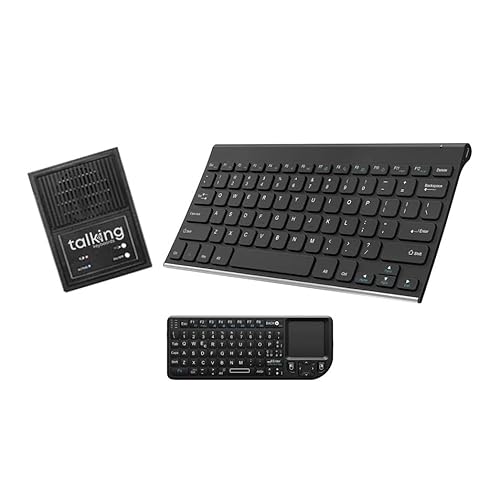
Talking Keyboards Dual Keyboard Standard & Mini Wireless AAC Device

Talking Keyboards The Wireless Standard AAC Device for Speech Therapy

Talking Keyboards Wireless Large Print AAC Keyboard

Joyreal 24-Button AAC Talking Device

Xylira 36 Preset and 6 Recording Button AAC Device for Home and School

Joyreal 63-Button AAC Device

Medical Guardian MGMini Medical Alert Device for Seniors, Black

Medical Guardian MGMini Medical Alert Device for Seniors, Rose Gold
The Details Behind The Selections
Two keyboard sizes give this setup more flexibility than a single fixed layout. The compact mini keyboard suits travel, while the standard keyboard offers familiar spacing for longer messages. Wireless operation and direct speakerphone or telephone connection also keep it useful in travel bags, bedside rooms, and family spaces.
The device speaks typed messages without requiring a computer, which makes it more approachable than a screen-based system. Compared with the button-heavy Joyreal options, it suits someone ready to type. You can store 30 personal phrases for quick needs and select English or Spanish speech with a male or female voice.
Advantages To Know
- Standard and mini keyboards support different spaces and mobility needs.
- Thirty stored phrases give fast access to repeated messages.
- Direct wireless calling avoids dependence on a computer.
- Alphabet-only and sticky-key modes offer different typing approaches.
Trade Offs
- Two keyboards may take more space to store than one compact unit.
- Typing remains a more demanding input method than pressing large picture buttons.
Quick Facts
Made For
This model benefits adults and older users who can type but want portable, computer-free speech generation.
A Better Fit Elsewhere
Joyreal 63-Button AAC Device suits someone who communicates more effectively through large buttons than sustained typing.
A standard computer-sized layout makes this keyboard a natural starting point for adults who already type comfortably. Its wireless connection and battery power remove the need to keep a computer nearby. That makes it practical beside a bed, across a dining table, or during appointments where a laptop would add bulk.
The device generates speech from typed text and supports an unlimited vocabulary, which is more flexible than a fixed set of physical buttons. Thirty stored phrases still cover recurring messages. Unlike the Dual Keyboard model, you receive one standard layout, giving you a simpler setup with fewer components to store.
Good Reasons To Consider
- Standard key spacing supports familiar touch-typing habits.
- Unlimited vocabulary extends beyond preset phrases.
- Wireless battery operation allows placement away from a computer.
- Selectable voice, language, and stored-phrase options support personalization.
Points To Note
- The full-size layout takes more room than a mini keyboard.
- Accurate typing is important for natural, detailed messages.
Right Fit For
This keyboard serves adults, seniors, and post-operative users who can type on a standard computer keyboard and need spoken communication.
Another Choice May Suit
Talking Keyboards Wireless Large Print AAC Keyboard better serves someone who benefits from oversized keys and a wider physical layout.
The 20-inch body and one-inch square keys create a very different typing experience from the compact Joyreal button devices. Large keys are easier to distinguish by touch, which can help someone with reduced vision or limited dexterity. You can still compose complete messages rather than selecting from a limited button vocabulary.
You can plug the keyboard into a laptop, tablet, or smartphone for regular computer use, while its speech function communicates through a connected speaker. That dual purpose may reduce the number of devices in a home office or care room. The wide body is useful, although it clearly needs more desk space than a compact keyboard.
Real-World Strengths
- Oversized keys improve visual and tactile key identification.
- The wireless layout supports use with several connected devices.
- Speech output adds a communication function to the keyboard.
- Direct connection avoids complicated installation steps.
Details To Watch
- The expansive footprint may be awkward on a small desk.
- Typing still requires enough hand movement and coordination for longer messages.
Feature Snapshot
Who It Suits Best
This keyboard fits users with impaired vision or limited dexterity who type on a computer but prefer larger, more distinct keys.
Look Elsewhere When
Xylira 36 Preset and 6 Recording Button AAC Device for Home and School offers a simpler button-based approach for users with limited typing.
Twenty-four picture-and-color buttons make this device approachable for someone beginning an AAC routine. Messages such as “yes,” “no,” “I’m thirsty,” and “it’s too loud” are available without typing or complex navigation. That directness can help during meals, family gatherings, therapy appointments, and short community outings.
Six additional buttons accept recorded messages, allowing familiar voices to deliver personalized phrases. Volume adjustment makes the device adaptable to quieter rooms and busier public spaces. The included storage bag also helps keep the unit and its accessories together during travel or school days.
Strengths Worth Knowing
- Twenty-four preset pictures cover common everyday needs.
- Six programmable buttons hold personally recorded phrases.
- Adjustable volume supports different listening environments.
- The lightweight body and storage bag support outings.
Small Caveats
- Preset vocabulary requires three AAA batteries, which need regular replacement.
- Custom recordings take time to create and organize before they become useful.
Core Details
Built With In Mind
This model suits beginners, families, and support staff establishing a simple picture-based communication routine.
Reach For A Different Pick When
Joyreal 63-Button AAC Device offers a wider range of choices for users who need more preset messages than this 24-button model.
Thirty-six preset buttons give this starter-style device more vocabulary than the 24-button Joyreal, while six recording buttons preserve room for personal messages. That balance can suit a household introducing AAC gradually. The mix supports routine requests at home, classroom needs, and familiar phrases without requiring a screen.
You can record the messages that matter most, such as a name, activity preference, or repeated classroom request. A beginner-friendly layout may be easier to introduce than a typing keyboard, particularly for a child who is still learning to select symbols. You may find that a smaller set of well-taught buttons produces more useful communication than a crowded board.
Well-Handled Touches
- Thirty-six presets cover more choices than smaller button boards.
- Six recording buttons provide space for customized language.
- The screen-free format supports simple, direct selection.
- Home and school positioning suits shared routines.
Practical Considerations
- Custom phrases need to be recorded before they can support daily use.
- A larger button layout may require more space on a table or communication board.
The Right Fit
This device fits families beginning an AAC routine, transition from picture exchange, or support a communication plan across home and school.
Swap It Out When
Talking Keyboards Dual Keyboard Standard & Mini Wireless AAC Device fits a user ready to type and needs broader spoken vocabulary.
Sixty-three arranged buttons cover a broad range of daily needs, choices, and feelings without a screen. Raised keys respond to light presses and provide tactile feedback, which can make selection easier for users with limited hand strength. The larger vocabulary makes this a practical choice for children and adults who need more options than a starter board.
Unlike the six-record-button Xylira, this Joyreal focuses on an extensive selection of direct choices rather than a large personal recording section. That design suits structured routines in homes, classrooms, and therapy settings. The trade-off is space, since so many buttons require a larger surface and some visual attention.
Positive Points
- Sixty-three buttons provide extensive everyday vocabulary.
- Raised keys deliver clear tactile feedback.
- Light activation suits limited hand pressure.
- The screen-free layout keeps interactions direct.
Potential Drawbacks
- The larger layout takes more room than compact button devices.
- Many choices can overwhelm a user who benefits from a smaller visual set.
Important Details
Made For
This device suits nonverbal children and adults who benefit from broad, button-based vocabulary and light-touch activation.
Consider Something Else When
Joyreal 24-Button AAC Talking Device offers a more compact starting point for someone still learning a limited set of core messages.
The MGMini is a medical alert wearable rather than an AAC speech-generating device, so it serves a different communication need. An SOS button connects the wearer with a 24/7 monitoring team through a two-way speaker. Emergency location assistance adds context for responders, while the lanyard or belt clip supports use at home and outdoors.
The black version may blend more readily with dark clothing or accessories, which can suit someone who wants the device to remain visually understated. A senior who can press a button and speak through the device may find this approach easier than typing on an AAC keyboard. It does not replace a communication aid for regular conversation needs.
What Earns Its Place
- Two-way speech permits direct contact with monitoring staff.
- Location assistance gives responders location information.
- The compact unit works with a lanyard or belt clip.
- Black coloring offers understated styling.
Things To Weigh
- A monitoring subscription is required for ongoing service.
- This device supports emergency contact rather than everyday AAC conversations.
Who Will Love This
This wearable fits an active senior who wants discreet emergency calling with two-way speech at home or while out.
Where A Sibling Pick Shines
Talking Keyboards The Wireless Standard AAC Device for Speech Therapy is the better match for spoken everyday messages with unlimited typed vocabulary.
Rose gold gives the MGMini a lighter look than the black version, which may suit someone who prefers a wearable that does not resemble a traditional medical device. The core function remains the same: pressing the SOS button starts a connection to a 24/7 monitoring team, and a two-way speaker lets the wearer communicate directly.
Included lanyards and a belt clip make placement flexible for a senior who spends part of the day at home and part of it outside. Compared with the AAC keyboards and button boards, the device offers much less everyday vocabulary and depends on a subscription. It belongs in the lineup for emergency communication rather than conversational support.
A Strong Showing
- The rose-gold finish offers subtle, lighter styling.
- Two-way speech supports direct communication with monitoring staff.
- Emergency location assistance provides responders with location details.
- Two wearing options accommodate different routines.
Less Ideal Details
- The required subscription is a continuing ownership consideration.
- It does not provide a general-purpose vocabulary for everyday speech.
Essential Details
Whose Shelf It Belongs On
This version fits a senior who values discreet styling, wearable placement, and direct emergency communication.
Another Choice May Suit
Joyreal 24-Button AAC Talking Device better serves a person who needs accessible everyday messages rather than emergency monitoring.
Matching Communication Needs With Practical Hardware
Match The Input Method To Ability
Typed devices suit someone with reliable spelling and hand control, while large keys help users who need more visual separation. Picture buttons reduce the amount of typing and spelling required. Match the device to the communication method already used most successfully rather than choosing the option with the largest feature list.
Consider Vocabulary And Setup
AAC means augmentative and alternative communication, methods that supplement speech or provide another way to express a message. Unlimited typed vocabulary offers flexibility but requires typing, while preset buttons simplify selection but limit the number of immediate choices. Recording buttons help, though personalized messages require time to prepare.
Plan Around Everyday Placement
A bedside keyboard, travel device, classroom board, and senior wearable serve different routines. Consider room size, carrying weight, power requirements, speaker placement, and whether another person can help maintain the system. A device that stays available and understandable will be more useful than one with advanced features that never become part of daily life.
Practical Checks Before You Choose
Common Shopping Slip Ups
Do not treat a larger button count as automatically better. Too many choices can overwhelm someone learning a new communication method. Likewise, a medical alert wearable answers an emergency need but does not provide everyday AAC vocabulary.
What Separates Premium From Basic
Higher-cost typing systems may offer broader vocabulary, multiple input layouts, language options, or specialized accessibility modes. Those additions help when the user can use them, but they add complexity. Basic button devices can serve everyday needs more effectively when the core messages are clear, accessible, and practiced.
Frequently Asked Questions
What Is An AAC Device?
An AAC device provides a way to communicate through speech, typing, pictures, recorded phrases, or selected symbols. It can supplement speech or serve as the primary communication method.
Which AAC Device Is Easiest To Start With?
A button-based device is often easier to introduce because each press produces a clear spoken message. Typed keyboards offer more flexible vocabulary once the user can type accurately and comfortably.
Are Large-Print Keyboards Only For Older Adults?
No. Large keys can support anyone who has difficulty seeing, distinguishing, or pressing standard keyboard keys. The deciding factor is the user’s vision, dexterity, and typing habits.
Can A Medical Alert Device Replace An AAC Device?
No. A medical alert wearable supports emergency contact, while an AAC device supports routine communication. Some households use both for different needs.
How Do You Choose An AAC Device Safely?
An appropriate specialist doctor and a speech-language pathologist can help assess communication needs and recommend suitable methods. Consider typing ability, vision, hand control, message needs, portability, and the support required for setup and maintenance.
Final Verdict
The best fit depends on how the person communicates most comfortably. Typed keyboard models favor spelling ability, large-print keys improve visual access, and button devices make frequent messages more direct. Consider the Medical Guardian options for emergency response rather than daily conversation, then choose a system that can be practiced and maintained in real life.
