

Long spreadsheet days and late-night phone scrolling can leave your eyes feeling tired, your screen text looking less sharp, and your frame pressing where it shouldn’t. Comfort matters as much as filtering, especially when you spend hours between a monitor, phone, and evening reading. These blue light filter glasses cover seven distinct needs, from magnifying readers to amber fit-overs, so you can match the eyewear to your desk, bedtime routine, and existing frames.
A Side-By-Side Look

Oilway Blue-Light Blocking Computer Glasses, 3-Pack

Prospek Blue Light Glasses

Eyekepper 1.5 Glasses, 5-Pack

GUNNAR Cruz Kids Glasses 12+
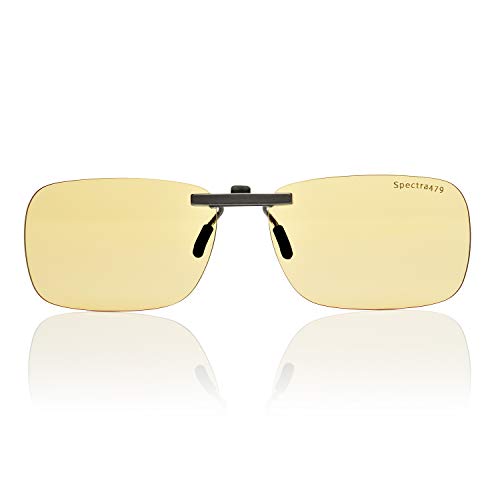
Spectra479 Clip-On Blue Light Glasses

Spectra479 Fit-Over Amber Glasses

kunchu Lightweight Retro Blue Light Gaming Glasses
Taking A Closer Look At The Options
Oilway’s three-pair format suits a household or workplace where eyewear moves between a desk, a sofa, and a bag. You can keep a pair at each regular location instead of repeatedly handling the same frame.
The clear polycarbonate lenses prioritize familiar screen colors, while the ergonomic shape spreads pressure across your nose and ears. This is a sensible starting point for people who want uncomplicated eyewear for computers, phones, television, and reading under indoor lighting.
What Pays Off
- Three pairs support easy placement around the home or office.
- Polycarbonate lenses keep weight down and add impact resistance.
- The anti-reflective, non-prescription lenses maintain clear color perception.
- Ergonomic shaping reduces pressure around your nose and ears.
Points To Note
- These lenses provide no magnification for small print.
- Three frames take more space than a single pair, so plan a convenient storage spot.
Key Specs
Made For In Mind
You benefit most from the Oilway set when several people share screens or you want a pair stationed at each of your main workspaces.
Consider Something Else When
Choose Prospek Blue Light Glasses instead when close-up text needs adjustable magnification alongside screen filtering.
Prospek gives you more control over magnification than a standard non-prescription pair. Available strengths range from 0.50 to 3.00 diopters, with 1.25 for modest close-up enlargement and a 0.00 option for ordinary screen use.
Unlike Oilway’s fixed three-pair format, this model combines a unisex black frame, flexible hinges, and eight lens coatings. The near-clear tint favors accurate-looking colors during design work, video calls, and everyday computer tasks.
Reasons It Performs
- Multiple magnification levels suit both close text and standard viewing.
- Eight coatings combine glare control with scratch and smudge resistance.
- The near-clear lens keeps screen colors looking natural.
- A case and microfiber cloth support storage and routine lens care.
Worth Noting
- The 1.25 setting enlarges text, so check whether that feels natural for your workspace.
- The frame is described as fitting medium faces, so compare its proportions with your own.
Feature Snapshot
Right Fit For
Prospek suits students, home-office workers, and professionals who divide their day between screen work and close-up reading.
Another Choice May Suit
Eyekepper 1.5 Glasses are a more focused choice when you want a consistent 1.50 reading power and a five-pair set.
Eyekepper builds around a specific need: making small print more distinct. The 1.50 diopter lens provides moderate magnification, which is useful for restaurant menus, product labels, fine book text, and close phone details.
Compared with Prospek’s adjustable strengths, this set offers one consistent magnification level across five pairs. Spring hinges and flexible temples support repeated daily wear, while the rectangular shape keeps the presentation restrained enough for an office.
The Case For It
- Five pairs suit multiple rooms, travel bags, and shared households.
- The 1.50 power gives close text a noticeable boost.
- Blue light filtering supports use during screen-heavy work or gaming.
- Spring hinges allow the temples to flex with repeated on-and-off wear.
Small Caveats
- The fixed 1.50 power is less versatile than Prospek’s range of strengths.
- Check the rectangular frame proportions against your face for a secure, comfortable fit.
Core Details
Who Will Love This
You benefit most from Eyekepper when fine print is a daily task and one reliable 1.50 magnification level meets your needs.
Look Elsewhere When
Prospek Blue Light Glasses suit you better when you want to change magnification for different tasks instead of using a fixed reading strength.
The GUNNAR Cruz is aimed squarely at children aged 12 and older who are moving into longer stretches of computer time. Its stated 65% blue light filtration gives you a concrete figure to compare with the filtering levels listed for adult-focused pairs.
Unlike Eyekepper’s 1.50 close-up magnification, the Cruz decision centers on blue light coverage and its younger age range. For household use, it offers a dedicated option for schoolwork, gaming consoles, and family computer stations.
What Works In Its Favor
- The listing specifies 65% blue light blocking.
- The design is intended for children age 12 and older.
- The Cruz model gives older children a dedicated screen option.
Practical Considerations
- Check the fit carefully because the model is specifically age-rated rather than universally sized.
- Children who need vision correction should confirm how their prescription lenses will work with the frame.
Built With In Mind
GUNNAR Cruz suits families seeking blue light filtering eyewear specifically for a child aged 12 or older.
Swap It Out When
Choose Oilway Blue-Light Blocking Computer Glasses instead for adults who need a non-prescription three-pair set covering several locations.
The Spectra479 Clip-On takes a different route from full-frame eyewear: it adds blue light filtering to a pair you already wear. That makes it useful for a home office where you alternate between your regular glasses and screen-focused tasks.
Where GUNNAR Cruz is designed for a specific age group, this clip-on is defined by its mounting format. You can move it between compatible frames, making it a straightforward option for people who do not want a second pair taking up desk space.
A Favorable Mix
- The clip-on format works with eyewear you already own.
- Blue light filtering suits computer and screen routines.
- You can move the eyewear between compatible frames as needed.
Possible Compromises
- Your existing frame shape and size determine how securely the clip-on sits.
- Adding a front-mounted piece can feel bulkier than a standalone full-frame pair.
Made For In Mind
Spectra479 Clip-On Blue Light Glasses suit you when you want screen filtering without replacing your regular prescription eyewear.
Reach For A Different Pick When
Choose Spectra479 Fit-Over Amber Glasses when evening screen use and an amber-tinted lens matter more than the compact clip-on format.
Amber tint gives the Spectra479 Fit-Over a different evening character from the clear daytime lenses used in most of this roundup. It is designed for phone, tablet, and computer use after dark, with blue-rich light from LED and fluorescent sources as its stated focus.
The fit-over construction lets you wear it over prescription glasses, avoiding the need to switch to a separate non-prescription frame. Compared with the Spectra479 Clip-On, this model looks more deliberately suited to nighttime screen sessions.
Well-Handled Touches
- Amber lenses offer a distinct option for evening device use.
- The fit-over format accommodates existing prescription frames.
- It targets blue-rich light from common indoor sources.
Details To Watch
- The amber tint changes the appearance of colors on your screen.
- The fit-over shape must have enough room to sit over your prescription frame.
The Right Fit
This pair suits people who wear prescription glasses and want a dedicated amber-tinted option for late-day screen use.
A Better Fit Elsewhere
Choose Oilway Blue-Light Blocking Computer Glasses instead when clear daytime color perception and a non-prescription multi-pair set matter more.
The kunchu pair brings a retro visual style to a gaming-focused frame while keeping the listed weight down. That combination makes it easy to consider for long sessions at a desk, especially when your setup already has a deliberately vintage look.
Oilway offers a polycarbonate three-pair set for several devices, whereas kunchu emphasizes lightweight construction and a single retro aesthetic. The practical distinction is stylistic: you are choosing a gaming-oriented frame rather than a multipack built around placement around the home.
Features That Help
- The lightweight design suits extended gaming sessions.
- The retro frame adds a distinctive look to a gaming setup.
- Blue light blocking provides the core screen-oriented function.
Less Ideal Details
- The retro styling may be less suitable for a conservative office environment.
- Compare the frame proportions with your face before committing to a long session.
Quick Facts
Who Should Grab It
The kunchu frame suits gamers who want blue light filtering in a lightweight, retro-styled pair.
Where A Sibling Pick Shines
GUNNAR Cruz Kids Glasses 12+ are a more focused fit for children and teens who need age-specific blue light filtering.
What Matters Most Before You Buy
Match the Frame to Your Current Eyewear
Full-frame glasses work as standalone eyewear, while clip-on and fit-over styles suit people who already wear prescription frames. A clip-on prioritizes compact placement, whereas a fit-over model offers more coverage but adds another layer. Check frame shape, temple width, and nose-bridge clearance before ordering.
Decide Whether Magnification Matters
Magnification is measured in diopters, with higher numbers producing greater enlargement of close text. A 1.50 strength can make menus and fine print easier to see, while 3.00 magnifies much more strongly. Use magnification for close work and choose a non-magnified option for normal screen viewing.
Weigh Clear and Amber Lenses
Clear lenses preserve a more natural-looking screen palette, making them practical for color-sensitive work and daytime use. Amber lenses provide a pronounced tint intended for evening device use. Consider whether you prioritize accurate-looking colors during the day or a distinct amber appearance after dark.
Judge Comfort by Your Routine
You will notice frame weight, nose pressure, and temple tension during long work sessions. Look for flexible hinges, balanced temples, and a face shape that matches the frame. For children, age guidance and fit deserve extra attention because a poorly positioned pair is easily adjusted less often.
Common Mistakes Worth Avoiding
Wrong Turns To Avoid
A blue light filter without the correct magnification can make close work less comfortable. Buying a clip-on without checking compatibility may also lead to poor positioning. Compare your prescription setup, face shape, and screen habits before choosing.
The Upgrade Payoff
Higher-tier models often spend more on lens coatings, magnification options, carrying cases, or frame hardware. Those additions matter most during frequent use, especially when glare, close text, or daily lens cleaning affects your routine.
Frequently Asked Questions
Do blue light filter glasses require a prescription?
Not necessarily. Non-prescription models work as standalone eyewear, while clip-on and fit-over styles can accompany corrective lenses.
Should I choose clear or amber lenses?
Choose clear lenses for natural-looking daytime colors and amber lenses for a more pronounced tint during evening screen use.
Are clip-on blue light glasses comfortable to wear?
Comfort depends on how securely the clip sits on your existing frame. Check the attachment shape and frame proportions before settling on a clip-on design.
Can blue light glasses help with close-up reading?
Only models with magnification are designed to enlarge text. A 1.50 strength offers moderate enlargement, while non-magnified lenses focus on screen filtering.
How long can I wear blue light glasses?
Wear them according to your comfort and the demands of your workday. Frame weight, nose pressure, and temple tension should guide how long they remain comfortable.
