

A call button can give an older adult a direct way to request help from another room, especially during a fall, sudden illness, or an urgent need at night. These systems suit family caregivers, nursing homes, clinics, and anyone who needs a simple way to connect a patient with a nearby caregiver. The right setup depends on the number of call points, alert type, range, and the person who will carry the receiver.
A Closer Look At The Lineup

CallToU Wireless Caregiver Pager System with 10 Waterproof Buttons

FullHouse Pager Wristband

ChunHee Pager Call Button System
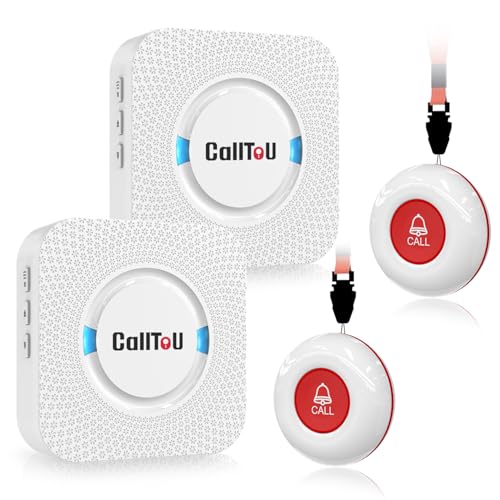
CallToU 2-Button Wireless Pager

CallToU Home Care Wireless Pager

CallToU 3-Button Wireless Pager

Lunderg Wireless Bed Alarm
The Picks, Examined More Closely
Ten call buttons make this a practical fit for a large home, nursing home, clinic, or restaurant where several spaces may need attention. The display shows the caller’s number and can announce it aloud, helping you distinguish a bedside request from a bathroom or hallway call.
The repeated-alert setting is especially useful for an older adult who may not realize the first signal was missed. You can also expand the system beyond the included ten buttons, making the CallToU Wireless Caregiver Pager System with 10 Waterproof Buttons a flexible option for expanding care settings.
Practical Pluses
- Numbered display and voice announcements help you identify the caller’s location more quickly.
- Ten waterproof buttons cover bedrooms, bathrooms, hallways, and other care points.
- The repeated alert reduces the need to press the button a second time.
- Open-area range reaches up to 1,000 feet for larger homes and facilities.
Things To Consider
- The 1,000-foot figure applies to open areas, so walls may shorten practical coverage.
- Ten buttons require thoughtful placement and clear room assignments.
Key Specs
Built With In Mind
This system suits families or facilities coordinating calls from several rooms and a single central caregiver station.
A Better Fit Elsewhere
FullHouse Pager Wristband suits a mobile senior who wants to wear the call button rather than mount it in a room.
The wristband format gives an older adult a call button that stays close to the hand instead of remaining fixed to a wall or bedside table. That makes the FullHouse Pager Wristband useful for someone who moves around a home, uses a wheelchair, or wants help without needing to reach a mounted device.
You get 52 alert melodies, five volume levels, and a silent visual mode using an LED flash. The receiver covers up to 1,000 feet in open air or about 500 feet through walls, giving a caregiver room to move between the bedroom, kitchen, and living area.
Strong Points
- Wearable, pocket, wall, bedside, and wheelchair placement options suit different routines.
- Silent LED mode avoids audible alerts when another person is sleeping nearby.
- Five volume levels accommodate different hearing and sleeping needs.
- No monthly fee keeps the system straightforward for home caregiving.
Points To Note
- The button is splash-resistant but should be removed before immersion in water.
- The receiver requires a power connection, so an outlet must be within reach.
At A Glance
Made For
This option fits active seniors and wheelchair users who benefit from keeping a call button on their body.
Consider Something Else When
ChunHee Pager Call Button System offers two portable vibration receivers for households needing quiet, tactile alerts in more than one caregiver location.
Two portable receivers make this a practical choice for relatives sharing nighttime care duties. Rather than relying only on a sound, each receiver can ring, flash, and vibrate, allowing you to notice a call without waking everyone nearby.
The two call buttons use an IP65 waterproof rating for bathroom and meal-splash exposure. You can carry a receiver in a pocket, clip it to a belt, or place it on a table, which makes the ChunHee Pager Call Button System practical for movement around the home.
Positive Points
- Two receivers let family members each carry an alert unit.
- Vibration and flashing provide alternatives to audible melodies.
- Four volume levels range from 25 to 110 dB for different listening environments.
- Call buttons and receivers can be carried or worn around the neck.
Soft Spots
- Each receiver needs two AAA batteries, so battery checks belong in your routine.
- Pairing two buttons with two receivers takes more setup attention than a one-button system.
Quick Facts
Right Fit For
This kit suits families sharing care duties where vibration or a visual flash is more useful than a strong audible alert.
Another Choice May Suit
FullHouse Pager Wristband is the stronger fit for a single caregiver who needs one wearable call button with 52 melody choices.
Two receivers and two call buttons cover a simple two-location arrangement without the larger equipment count of a facility setup. You can place one button at a bedside and another near the bathroom, then move each receiver around the house as your caregiving routine changes.
The CallToU 2-Button Wireless Pager operates across more than 500 feet in an open area. A receiver must remain plugged into power, but that does not prevent you from carrying it between the bedroom, kitchen, and living space.
Where It Helps
- Two call points suit separate bedroom and bathroom locations.
- Two receivers give two caregivers separate alert units.
- Receivers can move between rooms while remaining connected to power.
- Setup and connectivity assistance is available through 24/7 support.
Small Caveats
- The stated range applies to open areas and may differ around interior walls.
- Each receiver needs access to a suitable power outlet.
Who Will Love This
This system suits a two-person caregiving arrangement with separate bedside and bathroom call points.
Look Elsewhere When
CallToU Wireless Caregiver Pager System with 10 Waterproof Buttons fits a larger home or care facility that needs more call locations and numbered display.
One button and one receiver keep the setup direct for a single-patient apartment or a bedroom where one caregiver remains within earshot of the alert. The button offers a familiar way to request assistance without relying on a phone or raising a voice across the room.
You can carry the receiver from the bedroom to the kitchen or living area while keeping it connected to power. The CallToU Home Care Wireless Pager offers more than 500 feet of range in an open area, which gives you room to move around a typical home.
Points In Its Favor
- The one-button arrangement keeps placement and operation uncomplicated.
- A portable receiver lets you follow the patient between main living areas.
Honest Caveats
- Only one call point is included, so a second room needs another button.
- The receiver must remain connected to a power outlet.
- The 500-plus-foot open-area range is shorter than the longer-range systems in this lineup.
Best Suited To
This compact arrangement suits one caregiver supporting one patient in a straightforward home setup.
Reach For A Different Pick When
CallToU 3-Button Wireless Pager suits a shared home where several relatives need receiver access or more call locations.
Three call buttons and three receivers give shared caregivers more placement options without moving to a ten-button station. You can keep a receiver in the bedroom, kitchen, and living area, while placing buttons near the areas where assistance may be needed.
The CallToU 3-Button Wireless Pager has a 500-plus-foot open-area range, and setup help is available through 24/7 support. An available protection plan also lists coverage for accidental drops, spills, broken parts, breakdowns, and power surges, subject to its stated terms.
Useful Touches
- Three receivers support alert coverage in several caregiver locations.
- Three buttons cover more of a home than a single-patient setup.
- Setup and connectivity assistance can help you get the system running.
- The available protection plan includes several common household incidents.
Where It May Fall Short
- Receivers require nearby power outlets and cannot move far beyond their cords.
- The stated range does not account for every wall or floor arrangement.
Technical Highlights
Whose Shelf It Belongs On
This system suits shared family caregiving where three relatives need alert units in different home areas.
Swap It Out When
CallToU Wireless Caregiver Pager System with 10 Waterproof Buttons fits a caregiver station needing more call points and a numbered display.
The under-mattress sensor gives bedside monitoring a discreet appearance. Nothing needs to be worn around the neck or attached to a wrist, which may suit an older adult who dislikes visible monitoring devices or tends to pull off wearables.
The Lunderg Wireless Bed Alarm sends alerts to a pager you carry, keeping the notification away from the bedside. That arrangement can support a caregiver who wants a signal from another room without adding a visible call button or bedside sound.
Useful Highlights
- The sensor sits under the mattress and stays out of sight.
- No bedside wires or sound reduce visual and physical clutter.
- A wireless pager lets the caregiver carry alerts around the home.
- The design avoids requiring a wristband or pendant.
Practical Considerations
- This system focuses on bed-based monitoring rather than a wearable call button.
- The mattress placement requirement means you need a bed compatible with an under-mattress sensor.
Core Details
The Right Fit
This system suits home caregivers monitoring a bed-bound older adult who may resist visible wearables.
Where A Sibling Pick Shines
FullHouse Pager Wristband offers a more direct option when you want the older adult to initiate a call from any room.
What Matters Before You Pick an Alert Setup
Match the response method
A wearable button works best for a mobile person who can press it and wants to reach a caregiver directly. A vibration receiver helps light sleepers, while an under-mattress alarm suits someone whose bedside activity needs discreet monitoring.
Count the actual call points
List the bedside, bathroom, kitchen, and hallway locations that need coverage before comparing kits. Two-button systems suit smaller arrangements, while a ten-button station requires enough rooms, receivers, and labeling to make sense.
Check the home’s signal conditions
Open-air range figures are useful for a broad comparison, but walls, floors, and appliances affect actual reception. Place the receiver near the caregiver’s most common position, especially in a home with several floors or masonry walls.
Plan for power and maintenance
Some receivers need an outlet, while portable vibration units use replaceable batteries. Add battery checks or receiver charging to your regular caregiving routine so an alert does not go unnoticed.
Common Mistakes in Alert System Shopping
Wrong Turns To Avoid
A longer stated range does not guarantee the same result through every wall, so test coverage in the rooms that matter. Avoid buying for more buttons than you can place clearly, and confirm that the alert style suits the household’s sleeping situation.
What Separates Premium From Basic
More buttons, multiple receivers, numbered displays, and repeated alerts serve different households. A premium-style setup helps a caregiver distinguish callers or coordinate several relatives, while a basic one-button system remains practical for a single-patient space.
Frequently Asked Questions
Which elderly alert system works best for a home caregiver?
A system with enough call buttons for important rooms and an alert type the caregiver can notice is usually the best fit. Wearable buttons suit mobile seniors, while numbered displays help larger homes identify the caller.
Do wireless caregiver pagers work through walls?
They can work through some walls, but the stated range normally applies to open areas. Receiver placement, wall materials, floors, and other electronics can affect reception, so test the important rooms after setup.
Can an older adult wear a caregiver call button?
A wristband or pendant call button can be convenient for someone who moves around the home. Make sure the button remains easy to press and is removed before bathing when its water protection does not permit immersion.
Are under-mattress alarms less noticeable?
An under-mattress sensor stays hidden from view and avoids a bedside wire or sound. It serves a narrower purpose than a wearable call button, so consider it for bed monitoring rather than room-to-room assistance.
How many call buttons does a home need?
Count the locations where help may be requested, including the bedside, bathroom, and living areas. Two buttons cover a compact arrangement, while three or ten suit homes and facilities with more call points.
Wrap Up
The best elderly alert system is the one that matches how your family moves, sleeps, and receives help. A wearable button offers direct control, a multi-button station adds room identification, and an under-mattress sensor provides discreet bed monitoring. Match the setup to the real routine rather than adding more features than your home will use.
