

A bedside call button and a video monitor solve different parts of elderly care. A call button gives someone a direct way to summon help, while a camera system lets you observe a room, confirm activity, or listen for movement without adding internet service to the home. Your best option depends on whether you need hands-free reassurance, visual confirmation, or both.
The seven options below range from portable caregiver alerts to local baby monitors adapted for watching an older relative. The video systems provide useful visibility, though they aren’t substitutes for professional medical alert equipment. The CallToU pagers offer a more focused solution when a simple, one-button call to a nearby caregiver matters most.
Your Options, Compared

Firskids 2-Camera Baby Monitor

jeeber 5-Inch 1080P Monitor
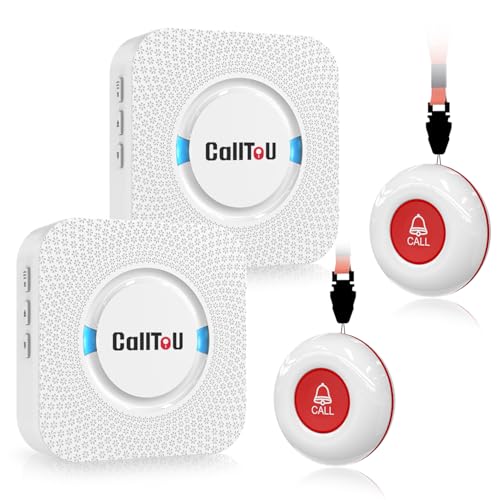
CallToU Pager, Two Call Buttons

CallToU One-Button Pager System

CallToU Pager 1+1 Black

UKSUP No-WiFi 30-Hour Monitor

Momcozy BM01 2-Camera Monitor
Inside Each Recommended Option
The Firskids system puts two camera feeds on a 6-inch IPS display, a practical arrangement for watching a bedroom and living area separately. Its local 2.4GHz connection avoids accounts and app downloads, which can simplify setup in a home with unreliable internet.
For an older relative who moves around or needs periodic reassurance, the split screen reduces the need to keep checking two displays. You also get two-way audio, a temperature sensor, 2x zoom, and sound-activated screen behavior. The baby-focused design remains, so this works best as room monitoring rather than a wearable alert system.
Reasons It Performs
- Two cameras remain visible together on the larger screen.
- Local FHSS transmission keeps operation independent of internet service.
- The stated outdoor range reaches 1,000 feet for larger homes.
- Two-way audio lets you check in without leaving the display.
- Temperature alerts add context to room conditions.
Things To Consider
- The 6-inch display takes more bedside space than a portable receiver.
- Outdoor range doesn’t translate directly through interior walls.
Feature Snapshot
Who It Suits Best
This system suits families using two cameras to follow an older relative in separate rooms.
Another Choice May Suit
CallToU Pager, Two Call Buttons suits you better when a direct help call matters more than visual monitoring.
The jeeber monitor balances screen detail with flexible camera placement. Its 5-inch IPS panel provides 1080P video, 3x zoom, and a 178-degree viewing angle, which can help you identify movement across a larger room without physically entering it.
Unlike the Firskids system, this model uses a smaller display but can accept up to four cameras, making it attractive for a home with several spaces to monitor. No app, account, or internet connection is required. That local setup may suit caregivers who want dependable access to video without managing a cloud account.
Everyday Perks
- 1080P resolution supports clearer room and movement checks.
- The system expands to four camera positions.
- VOX wakes the display after sound, conserving power during quiet periods.
- Infrared night vision supports low-light observation.
Worth Noting
- The 300-meter range is shorter than the Firskids system’s stated outdoor reach.
- The 5-inch screen offers less viewing area for side-by-side use.
Quick Facts
Made For
This monitor fits caregivers who want detailed imagery and flexible camera expansion across several rooms.
Where A Sibling Pick Shines
Firskids 2-Camera Baby Monitor provides a larger screen and longer stated outdoor range for two primary spaces.
Two receivers and two wireless call buttons make this CallToU set suited to a home with two caregivers or two areas where a resident may need assistance. Each receiver can move between the bedroom, kitchen, and living space, giving you flexibility to carry the alert wherever you’re working.
The system uses a radio connection rather than a video feed, so a button press alerts the receiver directly. That focused approach consumes less attention than watching a screen and may be easier to manage during daily care. The stated open-area range exceeds 500 feet, though interior construction affects actual reception.
Positive Takeaways
- Two receivers support simultaneous coverage in separate rooms.
- Two call buttons suit two bedside locations.
- Portable receivers let caregivers carry the alert while moving around.
- A 500-plus-foot open-area range suits many homes and gardens.
Minor Gripes
- You receive an alert but no visual confirmation of the room.
- Walls, floors, and household electronics may reduce practical range.
- The receivers require a power connection.
Right Fit
This set works well for two-caregiver homes where a simple wireless call is needed at more than one location.
A Better Fit Elsewhere
CallToU Pager 1+1 Black offers more control over alert volume and visual flashing for one caregiver.
A single receiver and single call button keep the CallToU One-Button Pager System straightforward. The resident can press the button, while the caregiver carries the receiver between the kitchen, bedroom, and living area. That arrangement suits a one-caregiver home where a dedicated alert channel is more useful than a multi-camera system.
Compared with the two-button CallToU set, this option leaves fewer components to distribute and manage. The receiver also has a stated open-area range above 500 feet, making the system workable in many homes. You’ll need a nearby outlet for the receiver, so placement should follow the caregiver rather than the resident.
Real Benefits
- One-button activation gives the resident a straightforward way to call.
- The portable receiver follows the caregiver through the home.
- The simple arrangement reduces the number of paired components.
Trade Offs
- Only one call button is included, so a second bedside needs another unit.
- Actual reception can decline through multiple walls.
Feature Rundown
Who Should Grab It
This pager suits a single-caregiver household needing one reliable indoor assistance call.
Reach For A Different Pick When
CallToU Pager, Two Call Buttons fits you better when two caregivers or two resident locations need alerts.
CallToU Pager 1+1 Black gives you a pendant call button and a plug-in receiver, creating a compact one-to-one call system. The receiver offers 55 ringtones, five volume levels from 0 to 110 dB, and a flashing LED, so you can tune the alert to suit a noisy kitchen or a bedroom with a sleeping caregiver.
The larger call button is designed for people with limited mobility, which makes it easier to locate and press. The receiver’s attention-getting combination of sound and light is more flexible than the standard paging setup. For one resident and one caregiver, the dedicated alert may be less distracting than maintaining a live video display.
Standout Benefits
- Five volume levels help match the alert to your surroundings.
- The flashing LED provides a second way to notice a call.
- A large pendant simplifies the action needed to request help.
- Pre-paired operation removes the need for complex pairing.
Small Caveats
- The receiver needs a nearby outlet and remains tied to one caregiver.
- Maximum volume may be more attention-grabbing than some homes want.
Built With In Mind
This system suits one-to-one care where the caregiver wants adjustable sound, light, and a large call button.
Consider Something Else When
CallToU Pager, Two Call Buttons fits multi-caregiver homes needing separate receivers and resident buttons.
The UKSUP monitor centers on mobility and camera positioning. Its 5-inch LCD, 2x zoom, and 1,000-foot stated range support monitoring a room from a distance, while the camera rotates 355 degrees and tilts 120 degrees to reduce blind spots. For a caregiver moving between spaces, that flexibility may be more useful than a fixed camera angle.
The stated 30-hour battery life is the main appeal for prolonged use, although charging and VOX settings will affect daily operation. Local operation means you can use the camera and audio without a Wi-Fi account. Unlike the Firskids and Momcozy systems, this one focuses on a single view rather than a split screen.
Everyday Advantages
- Wide rotation and tilt cover more of one room.
- The long stated battery supports extended monitoring.
- No internet connection or app setup is required.
- Audio lets you listen for movement in another room.
Practical Considerations
- It monitors one scene rather than two rooms at once.
- The 5-inch screen is smaller than the Firskids display.
Essential Details
Whose Shelf It Belongs On
This monitor suits a portable setup where one room and one highly adjustable camera are the priorities.
Swap It Out When
Momcozy BM01 2-Camera Monitor suits you better for simultaneous 1080P views of two separate spaces.
The Momcozy BM01 pairs two cameras with 1080P video and a 5-inch split-screen display. You can watch two areas at the same time, and the system automatically cycles between the two views, reducing the need to switch channels manually. That arrangement is useful for an older adult moving between a bedroom and nearby sitting area.
Its 360-degree camera field gives you broader coverage within each scene, while local operation avoids reliance on an internet connection. Compared with the UKSUP monitor, the BM01 prioritizes detail and two-camera coverage over adjustable single-camera movement. You still receive a baby-focused interface rather than equipment designed specifically around a wearer’s needs.
What Pays Off
- 1080P video provides fine detail in both feeds.
- Split-screen viewing keeps two areas visible together.
- Automatic camera cycling reduces manual display changes.
- The wide camera field covers more within each scene.
Points To Note
- The 5-inch display is smaller than the Firskids screen.
- Two-camera use requires arranging both camera positions.
Key Product Details
Best Suited To
This system suits families seeking detailed split-screen views of two areas around an older relative.
Not Your Match When
UKSUP No-WiFi 30-Hour Monitor fits you better when one adjustable camera and longer stated battery life lead your priorities.
What Matters Before You Bring a Monitor Home
Start with the kind of confirmation you need. A video monitor is valuable when you want to see movement, check a room, or communicate by audio. A wireless call button serves a more direct purpose: a resident or patient presses it to notify a caregiver.
Screen size also shapes daily use. The 6-inch Firskids display offers more room for split-screen viewing, while the 5-inch jeeber, UKSUP, and Momcozy screens take less space. A larger display can be easier to inspect during a busy caregiving task, but a compact unit may fit better on a small table or bedside shelf.
Local radio operation deserves special attention. The video monitors listed here work without Wi-Fi, accounts, or app downloads, which can reduce setup complexity. Call button systems also communicate directly with portable receivers. You should still test signal strength in the actual rooms, because walls, floors, and electrical equipment may affect the stated range.
Battery specifications help separate portable options. The UKSUP monitor states up to 30 hours, the Firskids system lists 16 to 30 hours, and the jeeber lists 2 to 16 hours. Sound-activated operation can reduce charging demands, although actual use varies with display activity and camera placement.
Common Mistakes Worth Avoiding
Expecting Every Device to Work Like a Medical Alert
A baby monitor or caregiver pager can support communication and awareness, but it does not automatically provide emergency response, fall detection, or health monitoring. Match the device to the specific daily task and retain a separate response plan for urgent situations.
Ignoring the Receiver’s Power Needs
Several CallToU receivers require a plug-in connection, so an outlet must be close to the caregiver’s normal position. Camera monitors also need regular charging. Check where the screen or receiver will sit before arranging furniture around it.
What Separates Premium From Basic
Paying for More Cameras or Screen Detail
The Firskids and Momcozy systems use two cameras to show separate spaces, while the jeeber can expand to four positions and the UKSUP concentrates on one adjustable camera. More views help larger homes, but they also require more placement decisions. Choose the feature that solves your most common need rather than adding cameras without a clear purpose.
Frequently Asked Questions
Can a baby monitor be used for an elderly relative?
Yes, for basic room observation, movement checks, and two-way audio. These models remain baby monitors, so their menus and features aren’t tailored to every elderly care situation.
Which type is better for an older adult?
A video monitor suits visible room checks, while a call button provides a direct way to request caregiver assistance. Your household layout and the type of reassurance you need should guide the choice.
Do these monitors require internet service?
The video monitors listed here operate without Wi-Fi, accounts, or app downloads. Call button systems similarly transmit directly to their paired receivers.
How important is indoor range?
Range matters when the resident and caregiver are separated by walls or occupy different floors. The stated distances apply under favorable conditions, so testing the planned rooms is essential.
Which option supports two caregivers?
CallToU Pager, Two Call Buttons includes two receivers and two call buttons. It offers the clearest fit for a home with two caregivers or two separate resident call locations.
Final Verdict
A camera system gives you visibility, while a wireless call button gives an older adult a direct way to ask for help. For two-room video checks, the Firskids offers the roomiest screen, while the Momcozy emphasizes 1080P detail. For a simple caregiver call, the two-button CallToU set supports shared coverage, and the 1+1 model adds adjustable sound and flashing alerts. Choose the arrangement that matches your home and daily routine.
