

A panic button gives an older adult a simple way to request help without shouting for attention. The right setup depends on whether you need phone alerts, wearable buttons, quiet vibration, or multiple receivers placed around the home. The receiver serves as the central alert unit, while each call button lets someone summon a caregiver with one press.
The Main Contenders
PILSAMAS WiFi Caregiver Pager

EverNary Wireless Caregiver Pager with Portable Receiver

SINGCALL Caregiver Pager

EverNary Add-On Plug-In Receiver for Caregiver Pager System

CallToU Caregiver Pager System
CallToU 2-Button Caregiver Pager

CallToU 3-Receiver Caregiver Pager
A Breakdown Of The Leading Choices
The PILSAMAS WiFi Caregiver Pager adds smartphone notifications to the familiar idea of pressing a button for help. The set includes two mounted-style call buttons and one wearable wristband, while its receiver links to a 2.4 GHz home network. That combination suits a caregiver who moves between rooms but still wants alerts when nobody is beside the receiver.
Its local alarm sounds with flashing lights, and the companion app can forward alerts to relatives. Unlike the local-only systems below, this model can carry a request beyond the room, although remote reach still depends on the network and notification settings.
The Case For It
- Phone notifications support caregivers away from the receiver.
- Two call buttons plus a wristband cover several daily locations.
- Named devices help responders identify the room quickly.
- Battery and signal status appear in the app.
- The receiver can cover about 230 feet through walls.
Practical Considerations
- Your network must support the 2.4 GHz-only connection.
- SMS, phone, and email alerts require a subscription.
Key Specs
Who It Suits Best
This setup fits families with several daily call locations and a caregiver who needs phone alerts beyond the receiver.
Where Another Pick Suits Better
The EverNary Wireless Caregiver Pager suits households that prioritize vibration and simple local alerts without Wi-Fi setup.
EverNary gives a caregiver freedom to carry the receiver through the home rather than leave it in one room. A call button acts as a transmitter, sending a wireless signal to the portable receiver, which rings, vibrates, and flashes. The included belt clip and pocket-sized format make it especially practical for overnight or bedside care.
Its 52 melodies help distinguish alerts, while four volume levels range from 25 to 100 decibels. The vibration mode is the thoughtful feature here, since a nearby caregiver can notice a call without waking the rest of the household.
Where It Delivers
- Portable receiver follows the caregiver around the home.
- Vibration provides a discreet alternative to sound.
- Two call buttons support separate bedside and table locations.
- Waterproof buttons suit kitchens, bathrooms, and humid care rooms.
- The lanyard or included battery makes each button easy to carry.
A Few Limitations
- Indoor range is listed at more than 50 feet.
- The receiver needs two AAA batteries.
Feature Snapshot
Built With In Mind
Night-shift caregivers and families supporting someone in several rooms get a portable alert unit with discreet vibration.
A Better Fit Elsewhere
The CallToU 3-Receiver Caregiver Pager offers broader room coverage for a household that needs a receiver in several locations.
The SINGCALL Caregiver Pager combines a portable receiver, a neck-worn call button, and 32 selectable ringtones. Its flashing LED gives a visual alert alongside sound, which can be useful in a busy care room. Mute mode also lets you silence the receiver during rest periods without losing the pairing.
Both pieces carry an IP55 rating, meaning they are designed to resist dust and water splashes. The receiver is rechargeable, while the button uses a replaceable battery. That distinction matters in a home where a caregiver can recharge one unit but should keep spare button batteries nearby.
The Helpful Details
- Thirty-two ringtones distinguish different users or rooms.
- Volume adjusts across a zero-to-100-decibel range.
- Open-area transmission reaches up to 328 feet.
- Both receiver and call button have IP55 protection.
- Detachable back panels support portable use or wall mounting.
Where It May Fall Short
- Its stated maximum range assumes an open area.
- The receiver supports fewer paired buttons than the EverNary system.
The Right Fit
This model fits caregivers who need water resistance, flexible mounting, and a rechargeable portable receiver for home care.
Another Choice May Suit
The EverNary Wireless Caregiver Pager suits larger setups that need support for up to 50 buttons or receivers.
The EverNary Add-On Plug-In Receiver is an expansion piece rather than a complete alarm system. It plugs into a standard 110-volt outlet and can be paired with compatible EverNary call buttons or motion sensors. This makes it useful when an existing setup needs another alert point in a bedroom, hallway, or sitting room.
Its 58 tones and five volume levels give you more ways to separate alerts by room. Unlike the portable receiver from EverNary, this unit stays connected to an outlet, which suits fixed locations better than on-the-go caregiving.
A Strong Showing
- Adds a fixed receiver without running wiring.
- Works with several compatible call buttons and sensors.
- Supports broad expansion for multi-room care.
Possible Compromises
- Call buttons and sensors are sold separately.
- Compatibility depends on the paired EverNary components.
- An available wall outlet is required.
Technical Highlights
Best Suited To
You need a permanent second receiver for an existing compatible EverNary caregiver pager setup.
Reach For A Different Pick When
The PILSAMAS WiFi Caregiver Pager suits households starting from scratch and needing app-based remote alerts.
The CallToU Caregiver Pager System keeps the arrangement straightforward: one wireless receiver and one call button. A caregiver can move the receiver between the bedroom, kitchen, or living area while it remains connected to an outlet. That portability is helpful for a home where the person providing care follows a daily routine.
The stated open-area range reaches more than 500 feet, giving the setup room to cover a house, yard, or similar property. It is a sensible compact choice for one older adult and one caregiver, though the single-button count may feel limited as household needs expand.
What Helps Most
- Simple setup for one recipient and one caregiver.
- Receiver can move between rooms near an outlet.
- The call button provides direct assistance requests.
Things To Consider
- The receiver requires a plugged-in power source.
- One button may not cover a large home.
At A Glance
Who Should Grab It
Simple one-room monitoring suits a couple or family caring for one older adult at home.
Look Elsewhere When
The CallToU 2-Button Caregiver Pager suits households that want buttons in two separate locations.
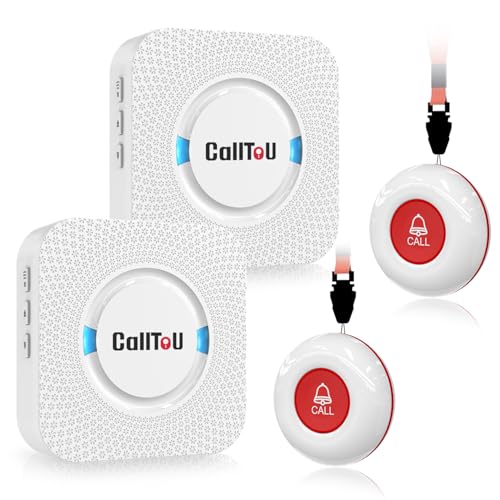
The CallToU 2-Button Caregiver Pager expands the basic single-button arrangement into a more practical two-location system. You receive two receivers and two call buttons, allowing a bedroom and living area to each have a dedicated alert point. That arrangement reduces the need to carry a receiver between rooms.
Each receiver can travel to another part of the home as long as it remains connected to an outlet. With a stated open-area range of more than 500 feet, this configuration can cover a larger home, although interior walls and room placement still influence everyday reception.
Notable Gains
- Two call buttons cover separate daily locations.
- Two receivers support simultaneous household monitoring.
- Each receiver can move near a different power outlet.
- The open-area range extends beyond 500 feet.
Points To Note
- Both receivers need access to electrical outlets.
- Two locations may still be limited in a large home.
Whose Shelf It Belongs On
This two-room configuration suits families supporting an older adult in the bedroom and main living area.
Where A Sibling Pick Shines
The CallToU 3-Receiver Caregiver Pager suits larger homes needing alerts in three separate locations.
The CallToU 3-Receiver Caregiver Pager is the roomiest of the three CallToU sets in this roundup, with three receivers and three call buttons. It suits a household that wants alert coverage in the bedroom, kitchen, and living area, or needs more than one caregiver to receive requests. The trade-off is additional receivers to place, power, and maintain.
Its more-than-500-foot open-area range supports broad placement, while the receivers can move between rooms near outlets. Compared with the compact CallToU Caregiver Pager System, the added components reduce the need to relocate equipment each day.
A Few Highlights
- Three call buttons support wider room coverage.
- Multiple receivers can serve separate caregivers.
- Receivers remain portable near powered outlets.
- The open-area range exceeds 500 feet.
Small Caveats
- Each receiver requires a nearby power outlet.
- Three units may be unnecessary for a small home.
The Details
Made For
Shared care across several rooms suits larger households with multiple caregivers or an older adult who moves around.
Swap It Out When
The SINGCALL Caregiver Pager suits a smaller setup that needs water resistance and a rechargeable receiver.
What Matters Before You Bring One Home
Follow The Alert Path
Start with the path a caregiver must take after hearing an alert. A local receiver works best when someone remains nearby, while phone notifications suit caregivers who move between home and other locations. Think about who needs to respond, where that person will be, and whether vibration or sound is more useful at that time of day.
Match Buttons To Real Locations
A bedroom button, kitchen button, and wearable wristband serve different routines. Buttons mounted near a bed work well for overnight needs, while a portable call button suits someone who moves around. More buttons do not automatically create a better setup, so place each one where a request for help is realistic and easy to reach.
Check Connectivity And Power
Wi-Fi systems need a compatible 2.4 GHz network and dependable placement near the receiver. Local systems avoid the router, but their reach still depends on walls, distances, and the receiver’s position. Plug-in receivers need outlets, while portable or rechargeable units offer placement flexibility with different charging and battery requirements.
Compare Expansion Carefully
Some systems accommodate dozens of buttons or receivers, while others are designed around a smaller household. Count the rooms, residents, and caregivers you expect to support. The PILSAMAS WiFi Caregiver Pager is the stronger fit for remote app alerts, while the local systems are simpler for a caregiver who stays near the receiver.
Practical Choices Before Installation
Pitfalls Shoppers Hit
A common mistake is counting buttons without mapping where help is needed. Another is assuming a stated maximum range will match conditions through several walls and closed doors. Check network requirements, receiver power, compatibility, and the caregiver’s response routine before placing equipment.
What The Higher Tier Buys
A higher-priced model often adds smartphone connectivity, rechargeable components, water resistance, or room-specific ringtones. Those additions help when a household needs remote notifications, discreet alerts, or a larger system. A simple local pager remains more practical when one caregiver is close to one receiver.
Frequently Asked Questions
Do panic buttons for elderly people need Wi-Fi?
Wi-Fi is required for the PILSAMAS WiFi Caregiver Pager, while the other listed systems operate through their local wireless receiver setup. Choose Wi-Fi for remote app alerts and local paging for straightforward alerts within the home.
Can one receiver work with several call buttons?
Yes, but capacity varies by model. EverNary supports larger expansions, SINGCALL supports up to 20 transmitters, and the CallToU sets provide a fixed number of matching buttons and receivers.
Which option is quietest for nighttime use?
The EverNary Wireless Caregiver Pager offers vibration alongside adjustable sound. SINGCALL also provides a mute mode and flashing LED, giving you several ways to manage alerts during rest periods.
Is a wearable call button useful for an active older adult?
A wearable button gives an older adult a familiar way to request help while moving around. It works best alongside mounted buttons for bedrooms or kitchens, since the wearable option cannot cover every location.
What should I check before expanding an existing system?
Confirm the receiver brand, model compatibility, power location, and supported number of paired devices. The EverNary Add-On Plug-In Receiver works only with the compatible call buttons and sensors listed for that system.
Closing Remarks
The right panic button for an older adult depends on who must respond. PILSAMAS stands out for Wi-Fi and app alerts, EverNary offers portable vibration and expandable local paging, and SINGCALL adds water resistance with a rechargeable receiver. For simple multi-room coverage, the CallToU sets scale from one button and receiver to three. Match the equipment to the household routine, then place each piece where it can do its job without adding daily friction.
